14 marketplaces
Local print costs, local currency
US, UK, Germany, France, Spain, Italy, Netherlands, Ireland, Belgium, Poland, Sweden, Canada, Australia, and Japan, each with marketplace-specific tiered print costs.
Free KDP royalty calculator
Free Amazon KDP royalty calculator and printing cost calculator for paperback and hardcover. Enter marketplace, page count, ink, and list price to see print cost, minimum price, and net royalty across 14 storefronts before you upload.
Calculate royalties freeWatch the workflow
See the product
Watch how marketplace, page count, ink, and list price turn into print cost, minimum price, and net royalty in one workspace.
One pricing workflow
Every input maps to Amazon’s print royalty math, so you stop guessing what a $9.99 paperback actually earns.
01
Pick Amazon.com, UK, EU, Poland, Sweden, Canada, Australia, or Japan, then set paperback or hardcover with black & white, standard color, or premium color ink.
02
Add your page count and move the price slider. The calculator updates print cost, minimum viable price, and net royalty instantly.
03
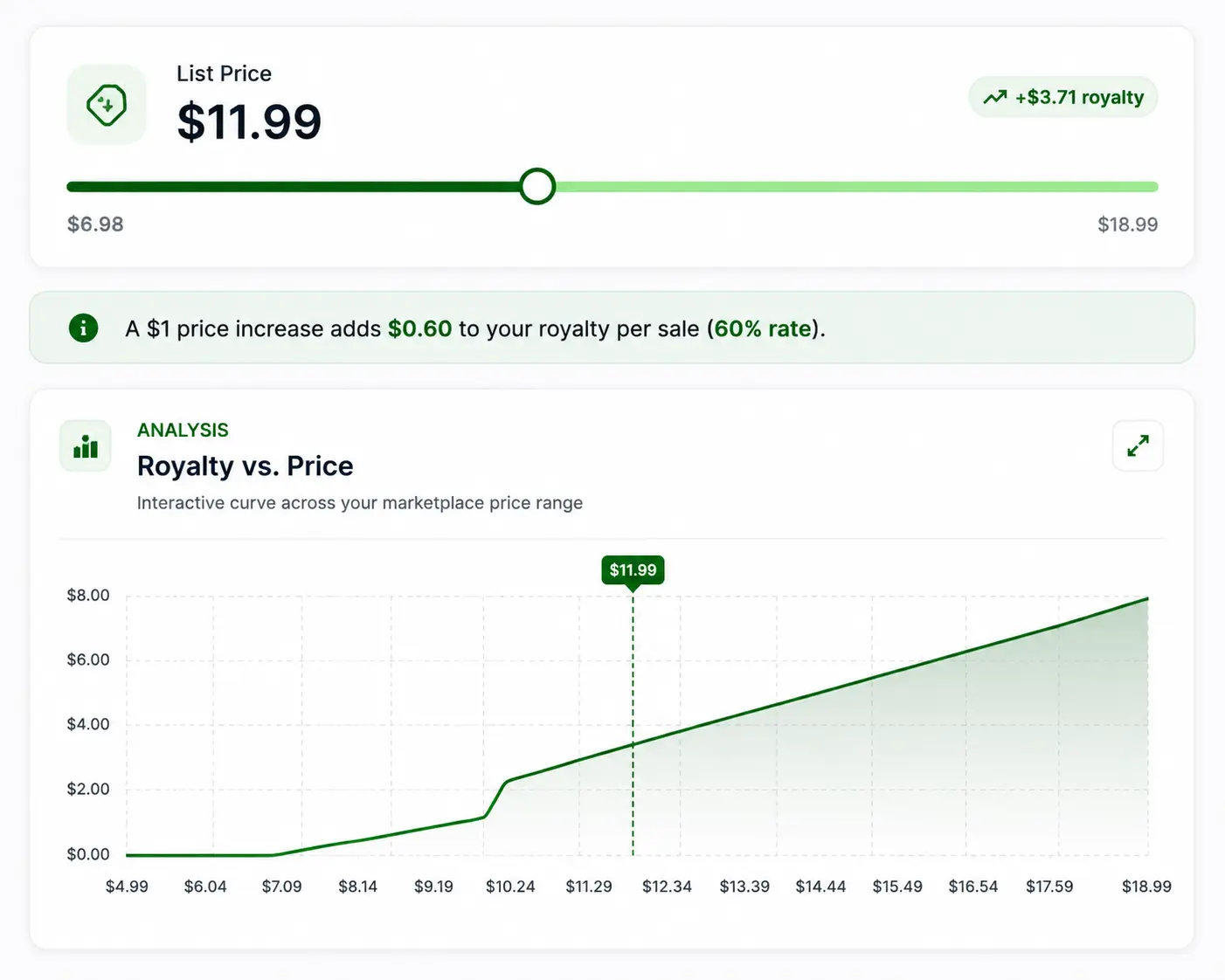
See royalty versus list price on a chart, compare what-if prices, and spot when a small price change improves your margin.
04
Use max sales, balanced, or max profit suggestions, plus optional AI pricing notes, before you lock your KDP list price.
Pricing suite
Not a generic royalty guesser. Marketplace print tables, format comparison, a live profit curve, and strategy suggestions in one KDP royalty calculator.
14 marketplaces
US, UK, Germany, France, Spain, Italy, Netherlands, Ireland, Belgium, Poland, Sweden, Canada, Australia, and Japan, each with marketplace-specific tiered print costs.
Print math
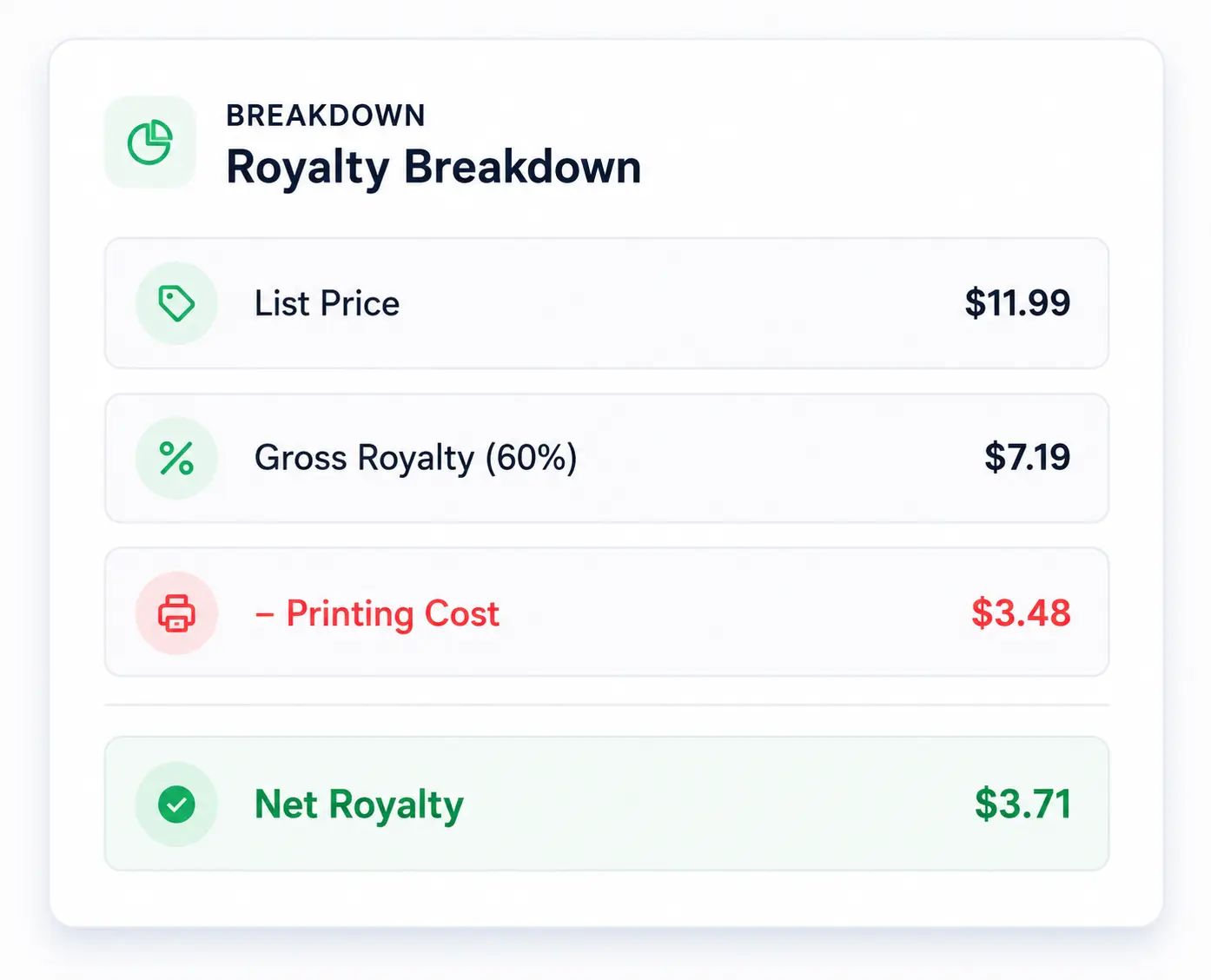
Printing cost = fixed cost + (pages × per-page cost). Royalty = (list price × 50% or 60%) − printing cost, depending on list price and marketplace.
Pricing
Know the lowest list price that still clears print cost, then see exact net royalty at every price on the slider.
Visualization
A live curve shows how royalty grows with list price so you can avoid huge page counts that eat margin at low prices.
Formats
Compare black & white, standard color, and premium color across paperback and hardcover before you commit trim and page count.
Guidance
Choose max sales, balanced, or max profit, then optionally generate AI recommendations based on your current specs.
See the numbers clearly
Low-content and activity books often die at the print floor. The RodBooks KDP royalty calculator shows print cost, gross royalty share (50% or 60%), and net royalty side by side, so you know when color ink or extra pages erase profit.
Built for real publishing decisions
Use the same Amazon KDP royalty math whether you are testing a first journal price or aligning a 20-book series.
Low-content publishers
Puzzle, journal, and planner books often sit near the print floor. Check print cost before you set a $6.99 to $9.99 list price.
Series publishers
Keep royalties consistent across volumes by reusing the same marketplace, ink, and page-count assumptions for every book.
International launches
UK, EU, and APAC print costs differ. Recalculate in local currency instead of guessing from a US-only spreadsheet.
Why RodBooks
Use Amazon’s royalty estimator to confirm final numbers in your Bookshelf. Use RodBooks earlier to compare markets, formats, ink, and list-price what-ifs with a live profit curve before you upload.
| Before | With RodBooks |
|---|---|
| Amazon official: one estimate in Bookshelf | RodBooks: plan print cost and royalty before upload |
| Static spreadsheet | Live royalty + print cost updates |
| US-only assumptions | 14 Amazon marketplaces & currencies |
| One price guess | Royalty vs price chart + what-if / profit |
| Paperback only thinking | Paperback & hardcover, 3 ink types |
| No pricing strategy | Max sales / balanced / max profit |
Worked examples
Illustrative Amazon.com black-and-white paperback scenarios using the same KDP print formula this calculator applies. Always re-run your exact specs in the tool and confirm in KDP before you publish.
6×9 · ~120 pages
A common word search or crossword trim. Enter ~120 pages, black ink, and a $9.99 list price to see print cost, whether you clear the 60% band, and net royalty per sale.
8.5×11 · ~120 pages
Same page count at a larger trim usually raises print cost. Compare 6×9 vs 8.5×11 in the calculator before you commit interiors for seniors or kids activity niches.
Profit check
Treat net royalty as your per-sale profit after print cost. Move the price slider to find the list price that balances conversion against margin for your niche.
Quick glossary
Short definitions so print cost, royalty rate, and list price stay unambiguous while you price.
KDP pricing guide
A practical sequence for print cost, minimum price, and profitable list pricing on Amazon KDP.
Enter marketplace, format (paperback or hardcover), ink type, and page count first. Amazon’s print cost is fixed cost plus a per-page charge. Color interiors and hardcovers raise the floor quickly, especially for low-content books under 100 pages. Until you know printing cost, any KDP price calculator guess is incomplete.
KDP paperback royalties use a 50% or 60% rate depending on list price and marketplace. List price must cover printing cost after Amazon’s share. The RodBooks calculator shows that minimum viable price so you never set a $5.99 paperback that cannot pay for manufacturing. From there, move the slider to see how each price point changes net royalty before you hit diminishing returns against competitive market pricing.
US, UK, EU, Canada, Australia, and Japan each use different print tables and currencies. Recalculate royalties for every storefront you plan to expand into. A price that works on Amazon.com can be too thin on Amazon.co.uk or Amazon.de once print cost and buyer expectations change.
Treat any third-party KDP royalty calculator, including RodBooks, as a planning tool. Amazon can update print rates. Always verify the latest royalty estimate inside your KDP Bookshelf for the exact marketplace, trim, ink, and page count of the file you upload. Then lock list price with confidence.
Full bleed vs no bleed printing changes file size and sometimes page count. Color bleed interiors cost more to print. Amazon KDP paperbacks are perfect bound, not spiral bound. Read the bleed vs no bleed and binding guide, then enter the real specs here so the printing cost calculator matches the book you will upload.
Frequently asked questions
Clear answers about how much KDP printing costs, how KDP royalties are calculated, marketplaces, and eBook limits.
Bleed itself is a trim setting. Full-color pages, extra leaves, and hardcover vs paperback change the print table. KDP does not spiral bind books. See the RodBooks bleed vs no bleed guide, then type the final page count into this calculator.
KDP printing cost depends on marketplace, page count, ink (black and white, standard color, or premium color), and paperback vs hardcover. Amazon uses a fixed fee plus a per-page rate. The RodBooks printing cost calculator shows that manufacturing cost next to your list price so you can see whether a $9.99 book still leaves a royalty.
KDP print royalties are calculated as (list price × 50% or 60%) minus printing cost. The 60% rate applies at or above your marketplace price threshold; otherwise the rate is 50%. This KDP royalty calculator runs that formula live as you change marketplace, pages, ink, and list price.
A KDP royalty calculator estimates how much you earn per paperback or hardcover sale after Amazon’s 50% or 60% royalty rate (by list price) and print-on-demand manufacturing cost. RodBooks uses marketplace-specific fixed and per-page print costs so you can set a profitable list price before you publish.
Royalty = (list price × rate) − printing cost. Rate is 60% at or above your marketplace threshold, 50% below it. Printing cost is fixed cost + (page count × per-page cost). Minimum list price uses the 50% band so royalties always cover print cost.
No. This tool focuses on KDP paperback and hardcover print royalties. Kindle eBook (35%/70%) and Kindle Unlimited (KENP) payouts use different rules and are not calculated here.
Not yet. The current calculator models the standard 50%/60% KDP print royalty path used for Amazon storefront sales. Expanded distribution uses a 40% rate and is not included in these estimates.
Amazon.com (US), Amazon.co.uk, Amazon.de, Amazon.fr, Amazon.es, Amazon.it, Amazon.nl, Amazon.ie, Amazon.com.be, Amazon.pl, Amazon.se, Amazon.ca, Amazon.com.au, and Amazon.co.jp, each with its own currency, royalty threshold, and print-cost table.
Costs follow Amazon KDP’s published print pricing structure (fixed + per-page by ink and format). Amazon can update rates, so always confirm the latest figures in your KDP Bookshelf royalty estimator before you publish.
Yes. Switch format and ink type to see how hardcover fixed costs and color per-page rates change your minimum price and net royalty at the same list price.
Yes. You can open the RodBooks KDP royalty calculator with a free account and run unlimited pricing scenarios. No credit card is required to start.
Yes for per-sale print profit. Net royalty after print cost is the profit figure most low-content publishers need before ads or returns. Move the list-price slider to compare profit at different prices.
The calculator includes UK, EU, Canada, Australia, Japan, and other listed storefronts with local print tables. Marketplace coverage can differ from Amazon’s full country list; if your storefront is missing, confirm numbers in KDP Bookshelf for that market.
Read the RodBooks guide on how KDP royalties and print costs are calculated for worked math and a 6×9 puzzle example, then return here to model your own specs in the free calculator.
Open the free Amazon KDP royalty calculator, enter your specs, and set a price that covers print cost and still leaves you a royalty.