Puzzle engine
Two ways to build
Use structured American and British templates for a classic look, or generate freeform grids across four difficulty levels.
KDP puzzle generator
Build crossword puzzle books for Amazon KDP: not classroom worksheets. Batch grids and curated clues, set 6×9 or 8.5×11 trim, auto-generate solution pages, and export one print-ready PDF sized for paperback upload.
Start the crossword generator freeWatch the workflow
See the product
Watch how the RodBooks puzzle workflow brings generation, layout, book structure, and export into one publishing workspace.
One publishing workflow
Every step is designed around the final paperback interior, so your puzzle decisions and page decisions stay connected.
01
Start with American or British templates, select a grid size, or switch to freeform generation with Easy through Expert difficulty.
02
Choose 6×9 or 8.5×11 trim, typography, clue spacing, page numbers, solution density, and the number of puzzles in your volume.
03
Inspect the puzzle, clues, pagination, and layout before export. Adjust the page visually instead of discovering problems after upload.
04
Add front matter, puzzle pages, and compact answer keys, then download one sharp PDF ready for your final KDP preview check.
Crossword production suite
Create the puzzles, design the reading experience, inspect the pages, and compile the book without rebuilding your work in a separate layout app.
Puzzle engine
Use structured American and British templates for a classic look, or generate freeform grids across four difficulty levels.
Clue workflow
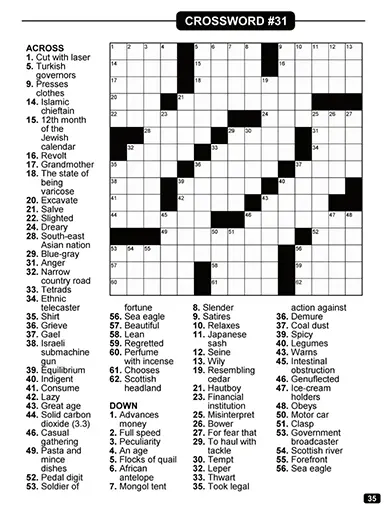
Generate complete playable puzzles with numbered Across and Down clues, consistent crossings, and matching solution pages.
Layout studio
Tune grid width, clue columns, type size, line spacing, page offsets, solution size, and page numbering before export.
Book compiler
Build a complete interior with title, introduction, copyright, table of contents, puzzle run, and answer section.
Print output
Vector-first output keeps grid lines and clue text sharp in print and gives you one organized file for KDP upload.
Approval step
The export workflow asks you to generate a live preview and approve the layout before the final book is created.
Real print output
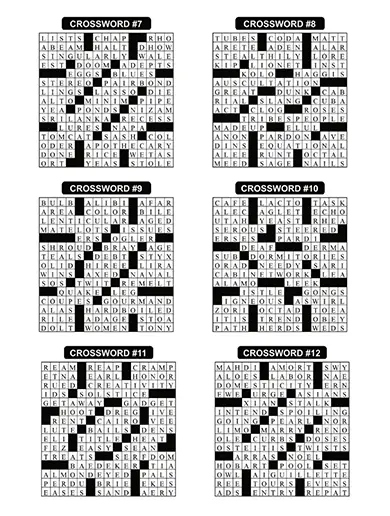
Crossword interiors succeed when the grid, clues, gutters, and answer keys remain comfortable on paper. RodBooks gives you direct control over those decisions before you create the final PDF.
Build for a clear reader
Set the challenge, readability, and visual rhythm around the audience promised on your cover.
Adults & seniors
Use larger page formats, generous clue spacing, and easier vocabulary for relaxed, accessible solving.
Themed series
Keep trim, grid style, typography, and solutions consistent from one volume to the next.
Themed KDP niches
Ship travel, seasonal, sports, or large-print crossword volumes with consistent trim, clue tone, and solution layout across every ASIN.
Why RodBooks
Free makers and homework tools stop at one grid. A KDP publisher still needs batch generation, solution pagination, front matter, trim-aware layout, and a single PDF Amazon will accept.
Build a complete crossword book
| Before | With RodBooks |
|---|---|
| Free classroom crossword maker | KDP crossword generator with book compiler |
| One worksheet or PNG export | Batch interiors for Amazon paperback |
| No trim or margin controls | 6×9 and 8.5×11 presets with layout studio |
| Manual answer-key assembly | Solutions generated and paginated with the book |
| Generic “make any crossword” | Print-ready PDF built for KDP upload |
| Separate layout software | Live preview and export in one workspace |
KDP export specs
RodBooks targets Amazon KDP paperback interiors: vector grids, embedded fonts, solution pages, and book structure in one file. Always confirm the latest margin and bleed rules in KDP Previewer before you publish.
6×9 · standard trim
The most common KDP crossword trim. Tune grid width, clue columns, and typography so puzzles stay readable without crowding the gutter.
8.5×11 · large trim
More page area for bigger cells and clue lists. Match trim before you batch-generate so numbering and pagination stay stable.
Full interior PDF
Title page, copyright, optional introduction, puzzle run, and compact answer keys (4, 6, or 9 solutions per page) exported as one KDP-oriented PDF.
Quick glossary
Short definitions so trim, solutions, and export settings stay clear while you compile.
Generator → KDP upload
These steps happen inside RodBooks. For covers, listings, categories, and series planning, read the full publishing guide linked below.
Define whether the book is for beginners, experienced solvers, adults, seniors, students, or a themed audience. That decision should control difficulty, answer length, clue tone, grid density, and type size. A large-print crossword book for seniors should not use the same page composition as a compact expert collection.
Select 6×9 or 8.5×11 before producing the full batch. Preview grid width, clue columns, line spacing, gutter comfort, and page numbers at the intended trim. Adjusting the system once is faster and safer than repairing a hundred pages after compilation.
A professional KDP crossword interior needs more than puzzle pages. Add a clear title page, copyright information, optional instructions or introduction, a useful table of contents when appropriate, and a well-organized solution section. Keep every volume in a series visually consistent so returning buyers know what to expect.
Download the compiled PDF, then use Amazon’s current preview tools to inspect margins, gutter space, clipping, blank pages, embedded text, and page count. KDP requirements can change, so the final responsibility is always to compare your export against Amazon’s latest paperback guidance before publishing.
Frequently asked questions
Clear answers about generation, book layout, solutions, exports, and Amazon KDP.
A KDP crossword generator creates puzzles and assembles them into a complete paperback interior for Amazon Kindle Direct Publishing. Unlike a single-sheet crossword maker, RodBooks includes trim-aware page layout, front matter, pagination, solutions, preview, and one PDF export.
Yes. RodBooks is built for Amazon self-publishers who need batch crossword books: not one-off classroom sheets. You get KDP trim presets, vector PDF export, automatic solution pages, and a book compiler in one workflow.
You can start free on RodBooks to test grids, layouts, and export. Paid plans unlock higher-volume batch generation when you are ready to publish a full crossword puzzle book on Amazon.
Homework and classroom makers output single puzzles. RodBooks focuses on KDP publishers: batch unique grids, curated clues, trim-aware layouts, front matter, solution pagination, and print-ready PDFs for Amazon paperback upload.
Yes. Set the puzzle count, compile the puzzle run, add a title page and optional introduction, copyright, and table of contents, then include compact solution pages at the back of the same PDF.
RodBooks supports Standard templates in American and British styles as well as Freeform generation. Freeform puzzles can be generated at Easy, Medium, Hard, or Expert difficulty.
The crossword studio includes 6×9 inch and 8.5×11 inch page presets. Tune puzzle width, clue region, typography, offsets, and solution layout within the selected trim before export.
Yes. Every generated crossword includes its solution. Format answer sections with 4, 6, or 9 solutions per page and adjust the solution title and sizing.
RodBooks creates a print-oriented PDF with the full interior structure in one file. Open every export in Amazon’s KDP Previewer and confirm the latest margin, bleed, font, and page-count requirements before publishing.
This page covers generation and KDP-ready export. For themes, covers, listings, and series planning, read the RodBooks guide: How to Create Crossword Puzzle Books for Amazon KDP.
Yes. Create a free RodBooks account without a credit card and test the crossword workflow. Monthly book and puzzle limits depend on your plan.
Batch puzzles, approve layouts, compile solutions, and export a print-ready interior: built for Amazon paperback publishing, not homework sheets.