KDP Cover Size Calculator Guide (Full Wrap Dimensions)
Calculate Amazon KDP paperback cover width, height, and spine for puzzle books: formulas, worked examples by trim and page count, and cover design next steps.
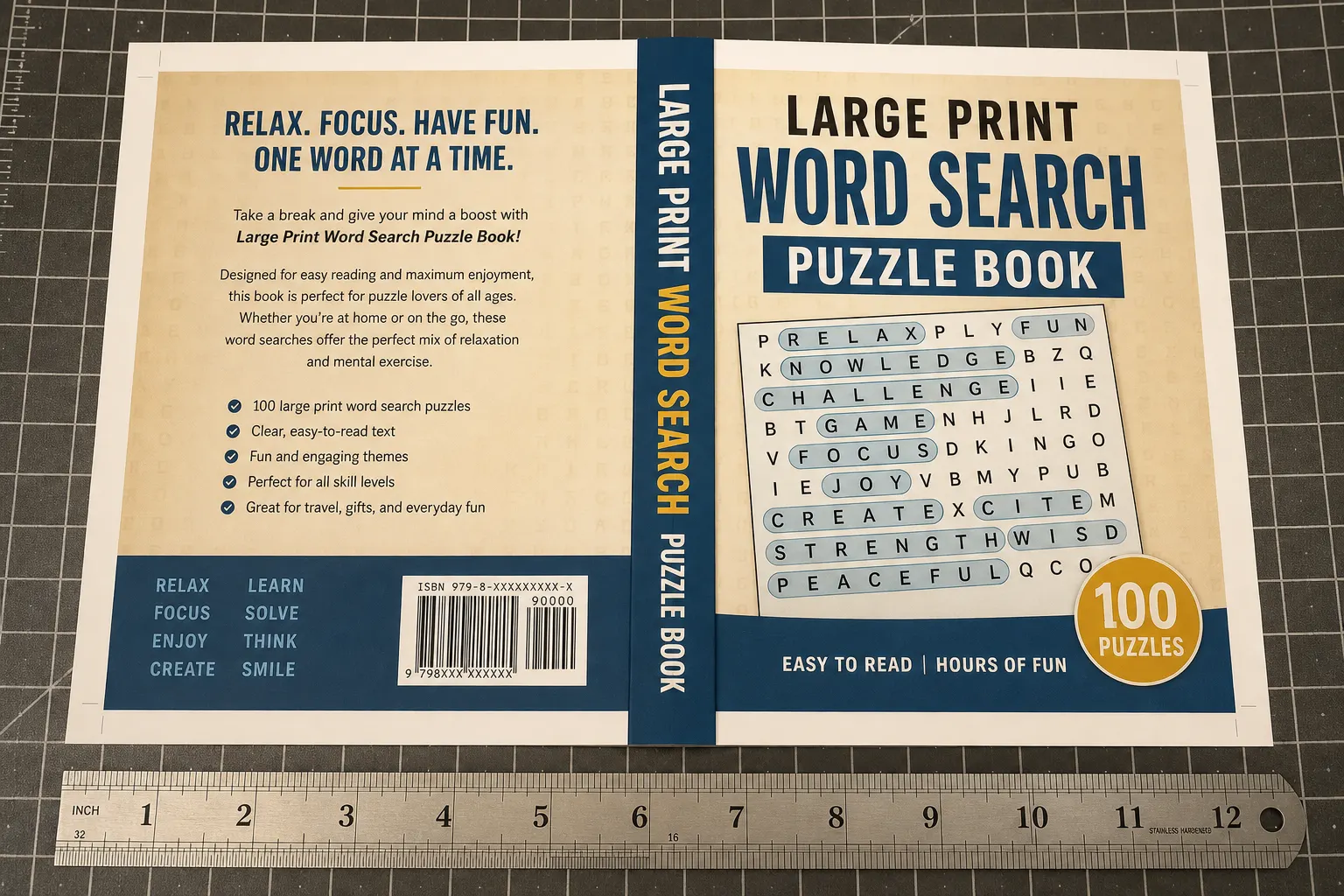
A KDP cover calculator answers one question: how wide and tall should the wrap PDF be for this trim, page count, and paper? Searchers looking for a KDP cover size calculator usually need the formula plus a starting chart, then a tool that builds art at those proportions. Use this guide while you lock trim and page count, generate concepts in the RodBooks cover designer, and confirm spine math in KDP spine width and full-wrap covers.
Wrong wrap size is one of the fastest ways to fail KDP review or ship a barcode that sits on the spine fold. Puzzle books are especially sensitive: thumbnail readability depends on front-cover proportions, while spine width depends on a page count that includes title, copyright, puzzles, and solutions.
See also: cover design after sizing the wrap, and page count before cover math.
The wrap formula Amazon expects you to follow
Paperback full wrap width is not “two covers plus a guess.” It is front trim width + back trim width + spine width + bleed on the left and right. Height is trim height + bleed top and bottom. Typical KDP bleed is 0.125 inches on each outer edge. Confirm the current values in Amazon’s own cover calculator before you upload, because paper thickness tables can change.
Spine width depends on page count and paper type. Planning approximations publishers still use:
- Black ink on white paper: about 0.002252 inches per page.
- Cream paper: about 0.0025 inches per page.
- Color interiors: thicker sheets, so the spine grows faster. Use Amazon’s current color table, not the black-ink estimate.
Page count must match the interior PDF you will upload, including blanks, title, copyright, and solutions. Guessing 120 pages when the file is 136 pages will misplace barcode and spine text. Lock the interior export first, then run the cover math, never the reverse for a paid print run.
KDP cover size calculator chart (common puzzle trims)
These are planning sizes for a no-surprise conversation with a designer. They assume 0.125 inch bleed on each outer edge and a paperback wrap. Recalculate spine for your exact page count. Values below use a 120-page white-paper example spine of about 0.27 inches.
| Trim (planning) | Example pages / paper | Approx. wrap width | Approx. wrap height |
|---|---|---|---|
| 6 × 9 in paperback | 120 pages, white paper | 12.52 in | 9.25 in |
| 8.5 × 11 in paperback | 120 pages, white paper | 17.52 in | 11.25 in |
| 7 × 10 in paperback | 120 pages, white paper | 14.52 in | 10.25 in |
| 8 × 10 in paperback | 120 pages, white paper | 16.52 in | 10.25 in |
Those widths assume 0.125 in bleed on both outer edges and a ~0.27 in spine. Recalculate spine for your real page count and paper. Front-only mockups are useful for ads and A+. They are not the upload file. KDP wants the full wrap for paperbacks, with the barcode area kept clear on the back cover.
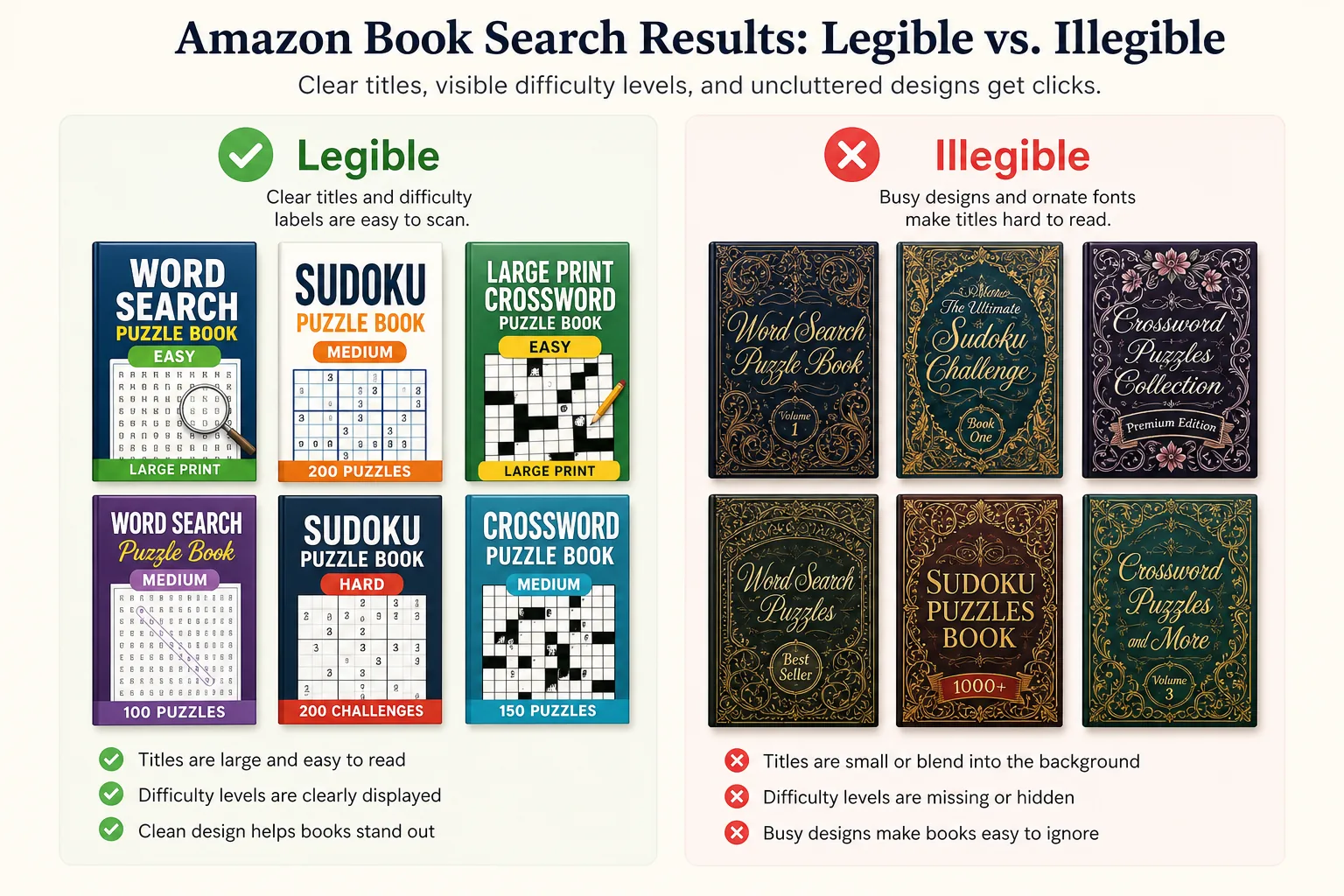
Thumbnail first: size math that still converts at 90px
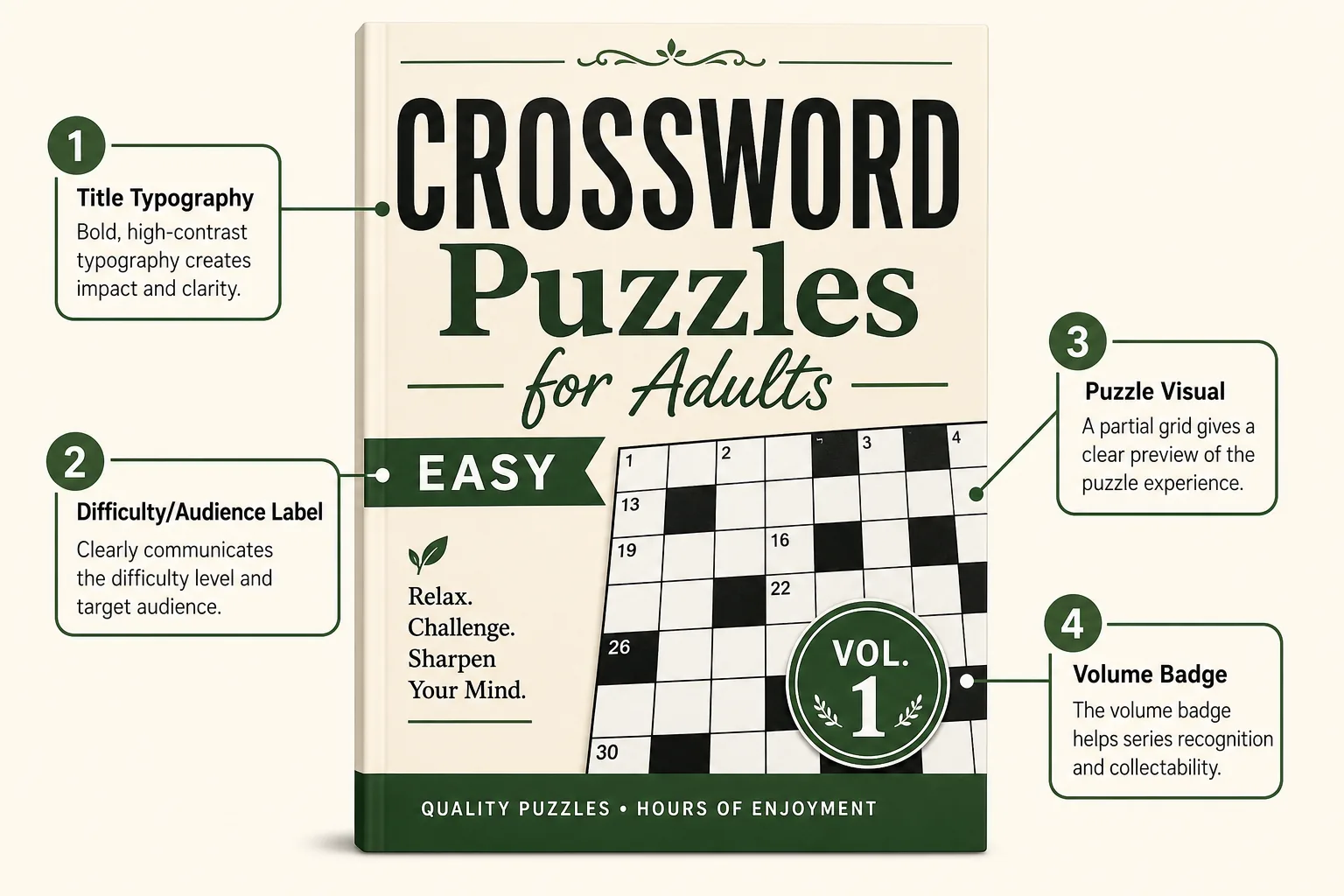
A perfectly measured wrap can still fail sales if the front panel is illegible in search. Design the front as if shoppers only see a tiny crop. Large puzzle-type label, high-contrast title, and one clear visual of the activity beat ornate borders that disappear when scaled down.
After you set canvas size in the cover designer, zoom out until the front is roughly the size of an Amazon search result. If you cannot read the puzzle type, rebuild hierarchy before you polish spine typography. Ads spend multiplies a weak thumbnail; they do not fix it.
Bleed, barcode, and spine text
- Keep live title text off the bleed strip and off the spine fold until you trust the spine width.
- Leave Amazon’s barcode box empty unless you are placing your own ISBN barcode in the allowed area.
- Do not stretch a 6×9 design to 8.5×11. Rebuild.
- Keep important art and type at least 0.125 in inside the trim on the front and back panels.
Bleed vs interior settings are a different file. See bleed vs no bleed and binding options for KDP books so you do not mix a no-bleed interior with a wrap that was built for the wrong trim. For which trims sell for puzzle books, see best KDP trim sizes for puzzle and activity books.
Workflow: lock trim → page count → wrap → proof
- Choose trim based on puzzle type and audience (travel 6×9 vs large-print workbook 8.5×11).
- Generate and export the final interior PDF so page count is real, not estimated.
- Note paper type (white, cream, or color) and ink setting you will select in KDP.
- Enter trim, page count, and paper into Amazon’s cover calculator and into RodBooks cover designer settings.
- Design the full wrap at those dimensions. Keep barcode zone clear.
- Export PDF/PNG, confirm pixel or inch dimensions against the calculator output.
- Upload to KDP and walk the online previewer page by page, spine text, barcode, and front crop.
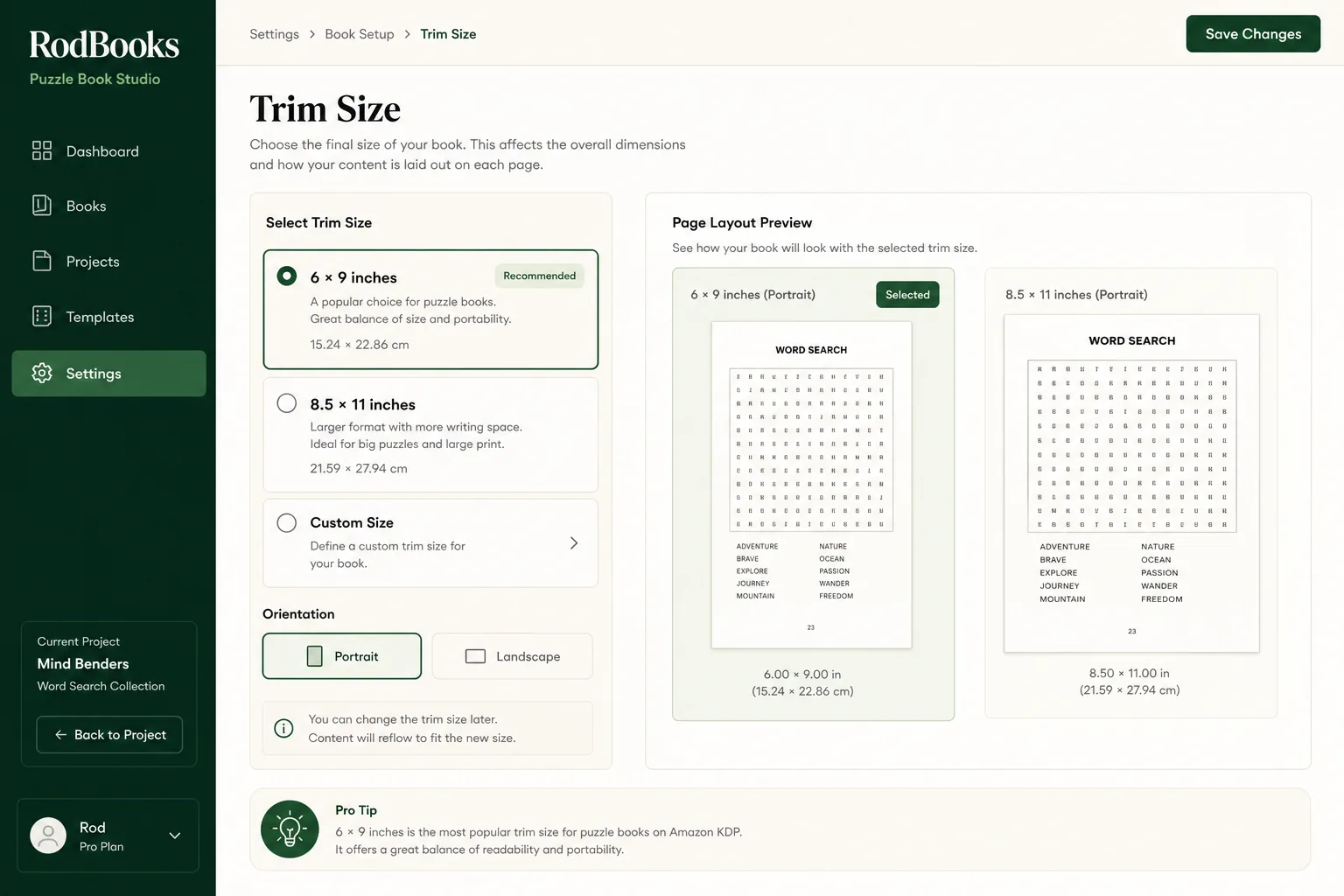
How RodBooks helps today
Cover Designer generates full-wrap or front-only concepts at KDP proportions from your trim, page count, and binding inputs. It is a concept studio with a size-aware canvas, not a replacement for the final check in Amazon’s calculator and print previewer. Download the asset, confirm dimensions against the formula, then upload or finish in your design tool.
Pair the wrap with A+ modules that reuse the same front visual. Use the A+ Content tool after the front cover is locked so comparison modules do not show an old mockup. Price the finished page count in the KDP royalty calculator before you set list price, spine changes and page padding both move print cost.
Checklist before you pay for ads on the cover
- Final interior page count is locked.
- Paper type (white, cream, color) is locked.
- Wrap width and height match Amazon’s calculator for those inputs.
- Puzzle type is readable at thumbnail size.
- Spine text is only on the spine, not drifting onto the front.
- Barcode area is empty of critical art and matches the ISBN plan.
Write the three numbers on the cover brief: trim, page count, paper. If any of those change after design starts, rerun the KDP cover calculator before you spend time on spine text. A 16-page difference on cream paper is enough to shift the barcode and look amateur in the online previewer. If you change trim after the cover is designed, start over, a 6×9 wrap scaled to 8.5×11 will stretch type and fail review.
Pixels, DPI, and file prep that survive upload
Amazon expects print-ready cover files at sufficient resolution for the physical wrap. Working at 300 DPI at the final inch size is the usual publishing habit. Designing a tiny PNG and scaling it up for upload softens type and makes puzzle icons muddy on the printed front. Build the canvas at final wrap size from the start, then export PDF or high-resolution PNG according to your finish tool.
Keep fonts outlined or embedded when you flatten to PDF. Soft proof RGB mockups for ads are fine; the KDP wrap should follow Amazon’s current color and PDF guidance. If you add a series badge or volume number, place it inside the live area, badges that sit in bleed get trimmed inconsistently across copies.
Hardcover case wraps need their own calculator pass. Hinges, flaps, and spine math differ from paperback. Treat hardcover as a second cover project even when the front art is related. The same rule applies when you offer both 6×9 and 8.5×11 editions: two interiors mean two wraps, two page counts, and two calculator runs.
Common wrap failures and how to catch them
- Spine text rotated the wrong way or drifting onto the front panel in the online previewer.
- Barcode covered by a busy pattern or a QR code you placed in Amazon’s reserved box.
- Front title that looks fine full-screen but collapses into a blur at search-thumbnail size.
- White sliver on the cover edge because bleed was omitted on one side of the wrap.
- Page count used for spine is the puzzle-only count, not the full PDF including solutions.
Catch these before you order a proof or spend on Sponsored Products. Ten minutes in the KDP previewer is cheaper than a reprint. When the wrap finally matches the calculator, freeze the three inputs (trim, pages, paper) in your project notes so a later interior tweak forces a conscious spine recalculation instead of a silent mismatch.
Working with designers and VA handoffs
If someone else builds the wrap, send a one-page brief: trim inches, exact PDF page count, paper type, whether the edition is paperback or hardcover, barcode plan (KDP-provided vs your ISBN), and the primary thumbnail text that must remain readable. Attach Amazon’s calculator output screenshot and the RodBooks canvas size so nobody “eyeballs” spine width.
Reject deliveries that arrive as front-only JPG when you need a full wrap PDF. Reject stretched redesigns that claim they “just scaled” a 6×9 to 8.5×11. Ask for a flattened proof at 100% zoom on the barcode box and spine folds before you approve. Your upload is still your responsibility in KDP even when a contractor clicked export.
Frequently asked questions
Is there a free KDP cover size calculator on RodBooks?
Cover Designer sizes the canvas from trim and page count. This guide is the public sizing chart. Always confirm with Amazon’s official cover calculator before publishing.
Why is my wrap too narrow?
Usually the spine used a lower page count than the interior, or bleed was omitted on both sides. Recalculate from the real PDF page count.
Do Kindle eBook covers use this wrap math?
No. Kindle covers are a front image with different recommended pixel sizes. This calculator logic is for paperback and hardcover wraps.
Can I use the same wrap for hardcover?
Hardcover case wrap uses different templates and often different spine and hinge measurements. Do not reuse a paperback wrap file unchanged.
Start publishing free: create a RodBooks account and generate a wrap concept at the right proportions, then verify the numbers in KDP before you print.