Amazon A+ Content Module Sizes for KDP Books
KDP A+ content sizes and module layouts for puzzle books: dimensions, image standards, and how to design modules that convert on Amazon.
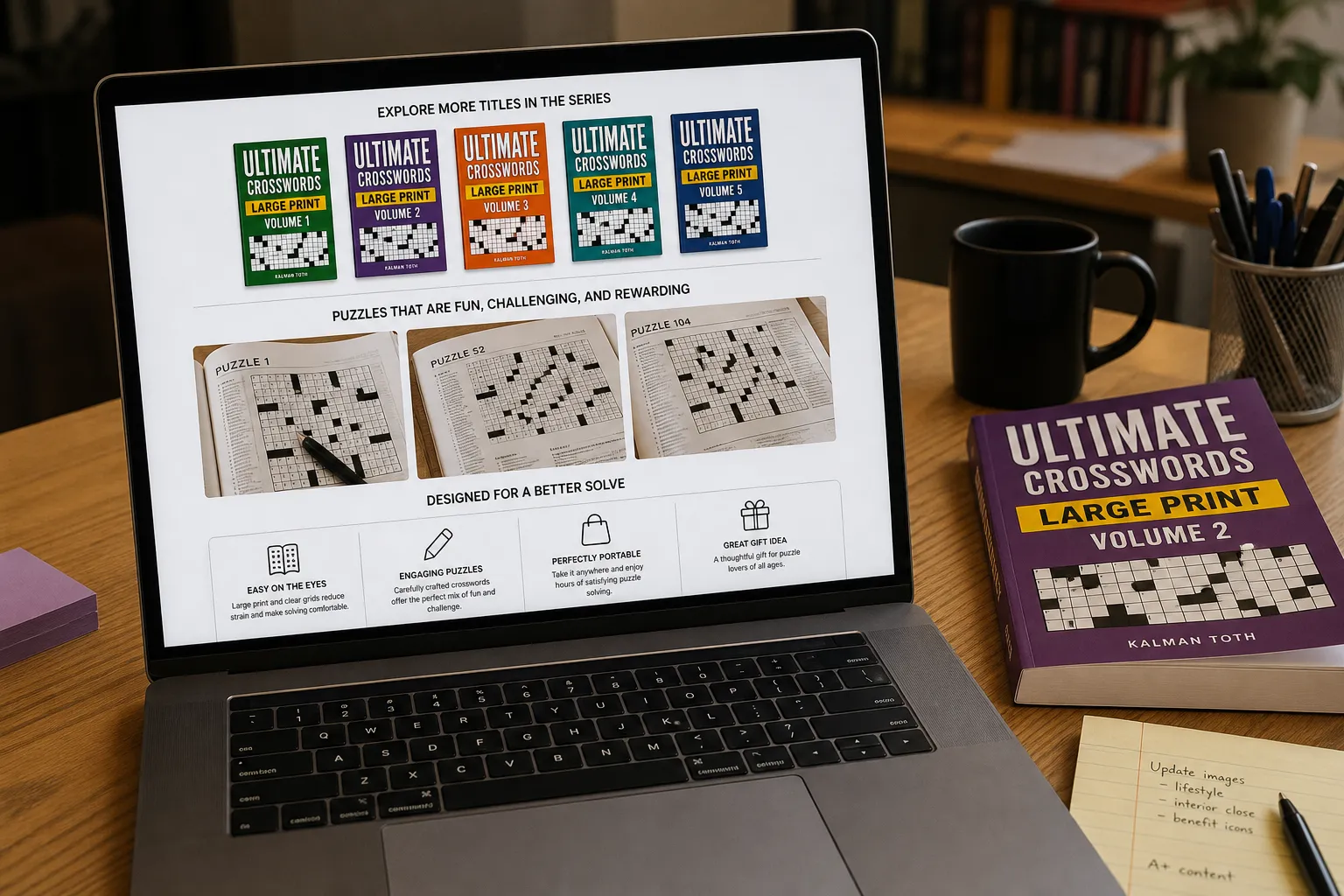
KDP A+ content sizes matter because Amazon only renders modules that match official pixel dimensions. This guide lists those sizes and shows puzzle-book layouts that convert. Build modules in the RodBooks A+ Content designer after your cover is locked.
A+ Content is one of the most underused conversion tools available to KDP publishers. It appears directly on your book's Amazon product page, below the description, above customer reviews, as a rich, visual content block that buyers see before making their purchase decision.
For puzzle books, A+ Content solves a specific problem: buyers cannot touch or flip through the book before buying. A+ Content lets you show interior pages, demonstrate print quality, highlight features, and visually reinforce the "Look Inside" experience, all within Amazon's own product page.
This guide covers: what A+ Content is and where it appears, how to access it as a KDP publisher, module types and their exact pixel dimensions, a strategic layout for puzzle books, image and copy guidelines, and the conversion impact you can expect.
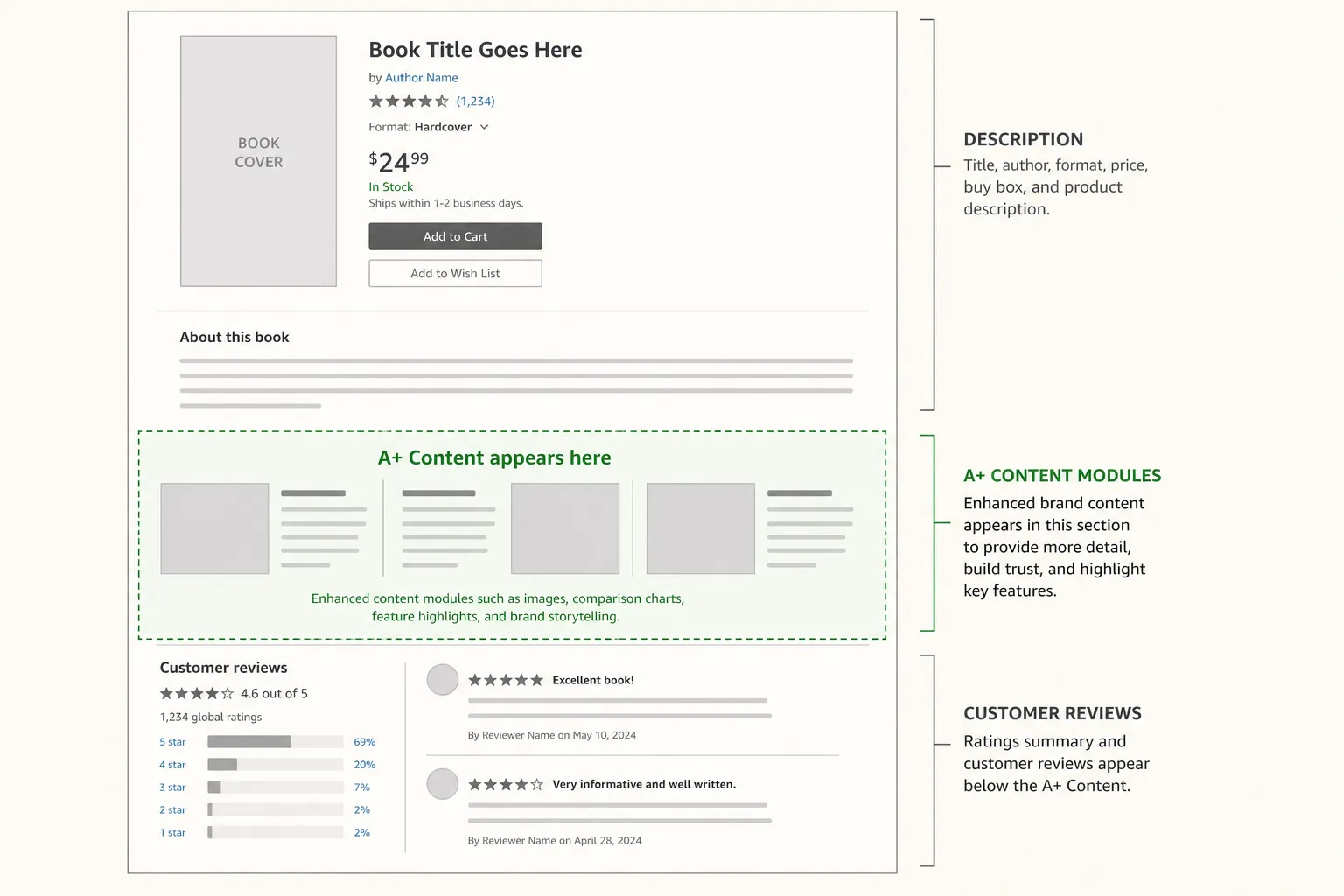
See also: cover design that matches A+ modules, KDP book description formula, and marketing a KDP book after A+ goes live.
What A+ Content Is and How to Access It
A+ Content (previously called Enhanced Brand Content for sellers, or Editorial Description in books) is a visual content block that replaces or supplements your plain-text description on Amazon product pages.
Access for KDP publishers: All KDP publishers have access to basic A+ Content (called "Basic A+" on KDP) for free. You do not need to be enrolled in Brand Registry as an author/KDP publisher. Access is through your KDP dashboard:
- Log in to kdp.amazon.com
- Open your title's listing
- Under "Book Details," find the "A+ Content" section
- Click "Create A+ Content" to open the A+ Content Manager
Processing time: A+ Content takes 1-7 business days to appear on the live product page after submission. Plan to create it before or immediately after publishing, not weeks later.
Important: A+ Content does NOT replace your text description, both can coexist. Keep your optimized text description in place and use A+ Content as an additional visual layer.
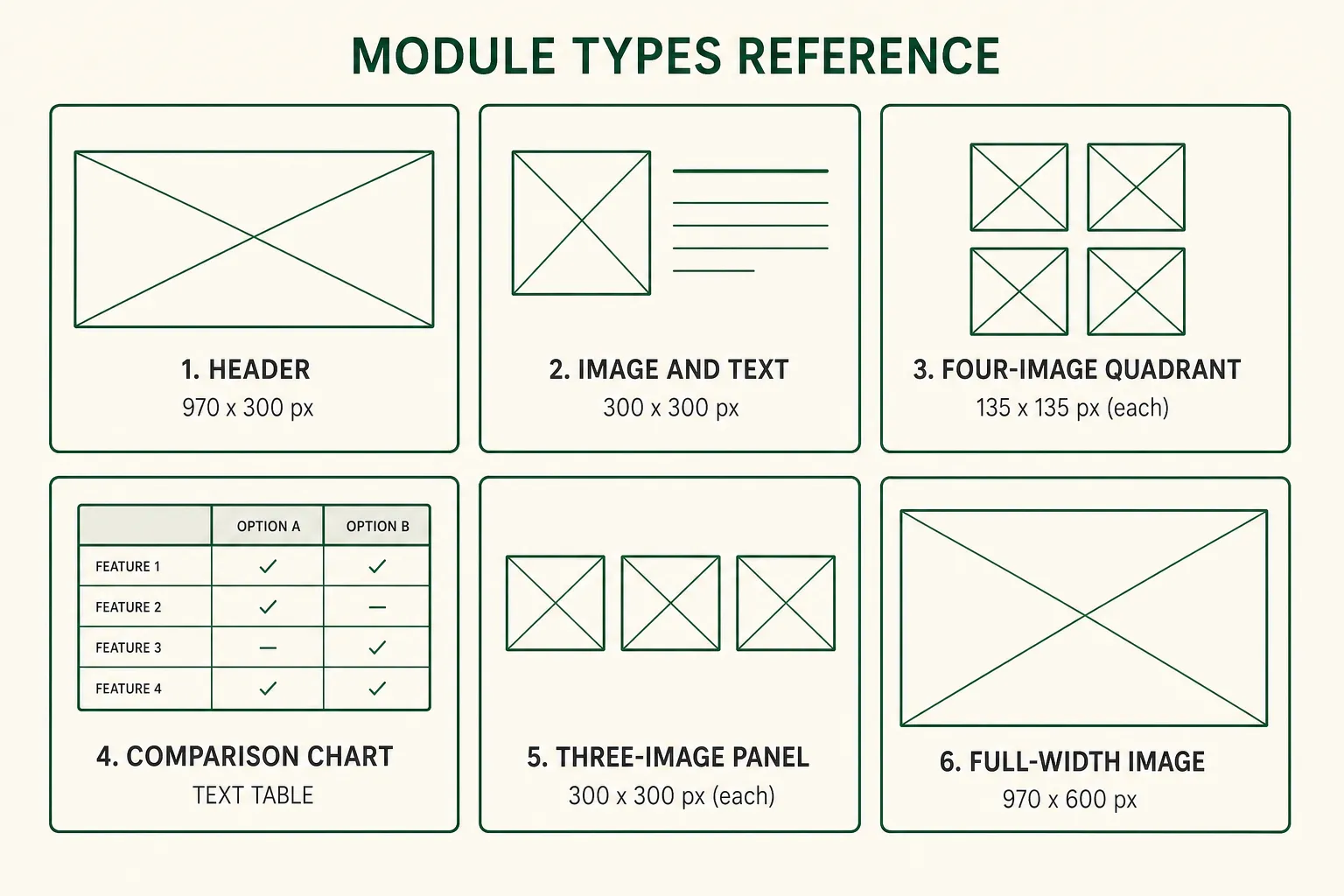
The Six A+ Module Types (with Exact Dimensions)
Amazon's Basic A+ offers several content module types. Each has specific image dimension requirements. Using the wrong dimensions causes automatic scaling that degrades image quality.
Module 1: Header Image with Text
Purpose: Full-width banner at the top of your A+ block. Brand image, series logo, or lifestyle visual.
Image dimensions: 970 × 300 px (desktop) / 600 × 180 px (mobile: Amazon scales automatically) Recommended pixel width: 970 px Text capacity: Short headline (max ~140 characters) and optional body paragraph
Best use for puzzle books: Series banner showing your brand name and the full series lineup. "The [Brand Name] Puzzle Series. Vol. 1 through 6 Now Available" with covers arranged side by side.
Module 2: Image and Text (Standard)
Purpose: Side-by-side image and text block. The workhorse module for feature highlights.
Image dimensions: 300 × 300 px (square) or 220 × 220 px Text capacity: Header line + 500-character body paragraph
Best use for puzzle books:
- Left: Interior puzzle page image (shows print quality)
- Right: Text describing puzzle type, difficulty calibration, and quality standard
Module 3: Four-Image and Text Quadrant
Purpose: Four images in a 2×2 grid, each with a short text label below.
Image dimensions: 135 × 135 px per image Text capacity: Short label (1-2 words) below each image
Best use for puzzle books: Highlight four features visually: puzzle grid, solution page, front cover, series lineup. Works well as a "What's inside" visual summary.
Module 4: Comparison Chart
Purpose: Table comparing product variants (editions, volumes, or difficulty levels).
Format: Text-based (no images), up to 5 columns × 5 rows Text capacity: Short cell entries
Best use for puzzle books: Compare your series volumes by difficulty, puzzle count, and trim size. "Vol. 1: Easy, 100 puzzles, 6×9" vs. "Vol. 2: Medium, 100 puzzles, 6×9" etc. This drives cross-sell among buyers who find one volume.
Module 5: Three-Image Panel
Purpose: Three equal-width images in a horizontal row, each with a caption.
Image dimensions: 300 × 300 px per image (displayed in a strip) Text capacity: Short caption below each image
Best use for puzzle books: Interior page spread, show the puzzle page (left), solution page (center), and cover or series lineup (right). This is the three-image sequence that communicates a complete, professional product.
Module 6: Full-Width Image Only
Purpose: A full-width visual with no text overlay.
Image dimensions: 970 × 600 px Best use for puzzle books: A designed interior spread showing 2-3 pages side by side, demonstrating the print quality, grid clarity, and solution format at high resolution.
The Recommended Puzzle Book A+ Layout
Based on conversion patterns, this 4-module stack consistently performs well for puzzle books:
Module 1: Header: Series/Brand Banner (970 × 300) Visual: Your series covers arranged side by side, or a lifestyle image of someone solving your book type. Headline: "[Brand Name], [Puzzle Type] Books for [Audience]" Body: One sentence describing your publishing mission or series promise.
Module 2: Image+Text: Interior Quality Proof (300 × 300 image) Image: Full-quality screenshot of your puzzle page interior (grid, clues, margins clearly visible). Headline: "Print-Quality Pages, Every Time" Body: Describe the grid clarity, layout quality, and the fact that every puzzle was previewed before export. Addresses the #1 unspoken buyer concern (will this look good in print?).
Module 3: Three-Image: Complete Book Walkthrough Image 1: Puzzle page (grid + clues) Image 2: Solution page (compact solutions section) Image 3: Front cover or series lineup Captions: "Every puzzle", "Every solution", "Every volume"
Module 4: Comparison Chart: Series Overview Columns: Volume 1, Volume 2, Volume 3 (or Easy, Medium, Hard) Rows: Puzzle Count, Difficulty, Trim Size, Audience, Page Count
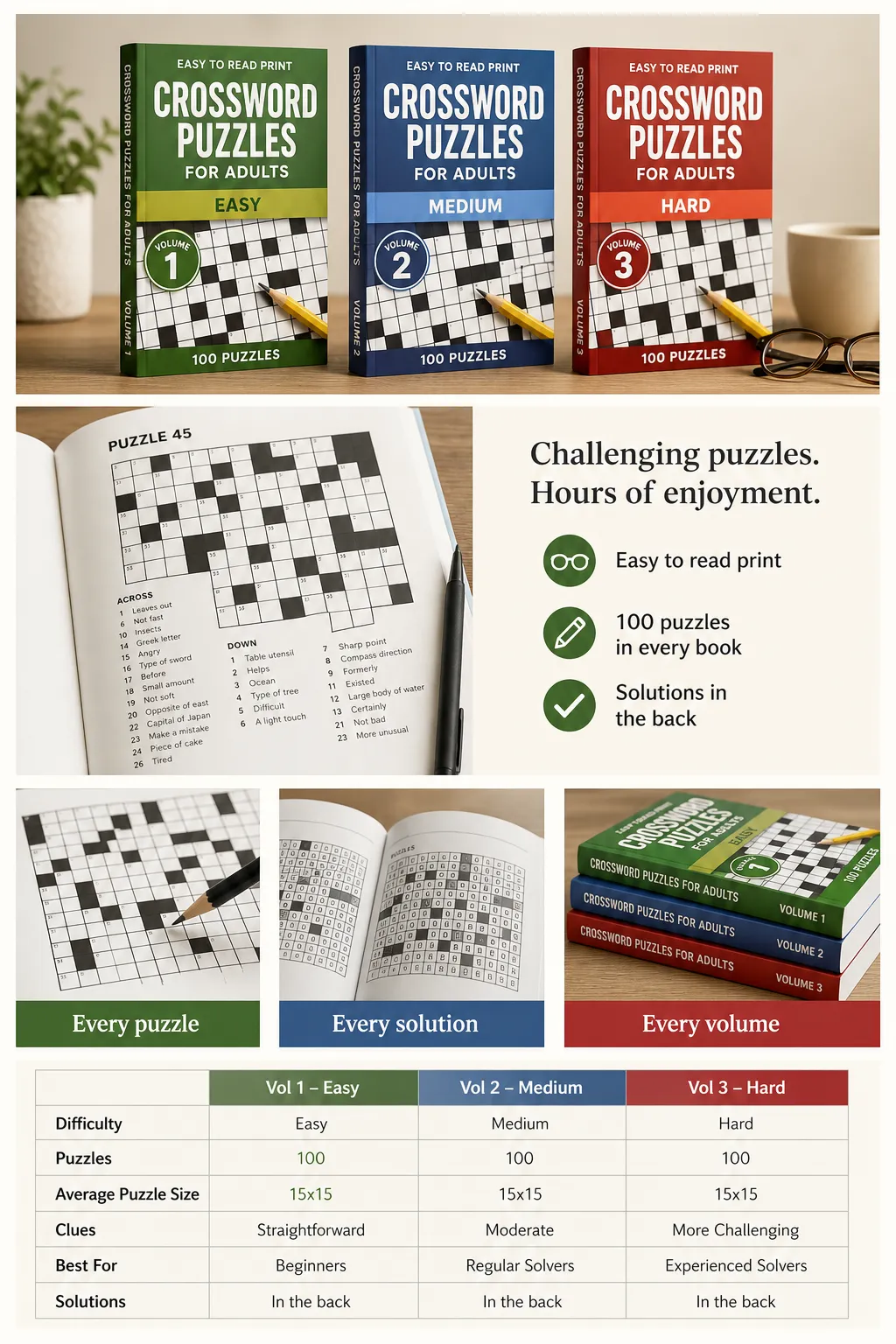
Image Quality Standards for A+ Content
A+ Content images are displayed on Amazon's product pages at high resolution. Unlike product thumbnails, these images are viewed at full module width, quality is visible.
Minimum requirements:
- RGB color mode (not CMYK)
- 72 DPI minimum (Amazon scales for screen display)
- File format: JPG or PNG
- Maximum file size: 2 MB per image
Recommended quality:
- Design at 2× the required pixel dimensions for retina/high-DPI screen clarity
- Use actual product screenshots rather than stock images, authenticity converts better than polish for puzzle books
- Interior page images should be photographed or screenshotted at print resolution (300 DPI source)
Text in images: Amazon's A+ guidelines require that text in images must also appear as text in the module's text fields (accessibility requirement). Do not build all-image modules with text baked in as the only version of that text.
Copy Guidelines for A+ Content
A+ Content copy is indexed by Amazon's search algorithm, it contributes to your book's keyword relevance alongside title, subtitle, description, and backend keywords.
Best practices:
- Include your primary keyword naturally in the header module headline
- Use feature-specific language in body text: "one puzzle per page," "compact 6-per-page solution section," "American-style 15×15 crossword grids"
- Write in second-person (you/your), this voice performs better in product copy than third-person
- Keep body paragraphs under 100 words per module. A+ Content is scanned, not read linearly
Avoid:
- Repeating your full description verbatim. A+ Content should complement, not duplicate
- Promotional language ("best puzzle book"), against Amazon guidelines
- Competitor mentions or brand comparisons (allowed in comparison charts but must be factual)
Using RodBooks A+ Content Designer
RodBooks A+ Content Designer generates pixel-perfect A+ module images at the exact dimensions Amazon requires, with puzzle-book-specific templates for the interior page showcase, series comparison chart, and brand banner modules.
Design your A+ Content modules →
Frequently Asked Questions
Does A+ Content affect Amazon search ranking?
A+ Content copy is indexed by Amazon's A9 algorithm, contributing to keyword relevance. However, the impact is secondary compared to title, subtitle, and backend keywords. The primary value of A+ Content is conversion rate improvement, not search ranking.
How long does A+ Content take to appear on my product page?
Amazon's review and publication process for A+ Content takes 1-7 business days. Plan to submit immediately after your book goes live. The gap between publish and A+ Content live is a period where your listing is underperforming.
Can I have different A+ Content for each volume in my series?
Yes. Each ASIN (each published title) has its own A+ Content. You can use similar or identical modules across volumes (reusing the comparison chart, for example) or customize each volume's A+ Content to highlight its specific features. Reusing templates saves time; customization adds specificity.
Is there a limit to the number of modules I can add?
Basic A+ allows up to 5 modules per product page. You can stack up to 5 of the available module types in any order.
What is the difference between Basic A+ and Premium A+?
Premium A+ (also called A++ Content) includes interactive modules, video, and more complex layouts. It is only available to sellers enrolled in Brand Registry with a high-performing A+ track record. KDP publishers can access Basic A+ without Brand Registry.
A+ Content Checklist
- A+ Content Manager accessed through KDP dashboard
- 4-module stack planned (Header, Image+Text, Three-Image, Comparison)
- Images exported at correct pixel dimensions for each module type
- Interior page images captured at print-quality resolution
- Text copy written for all module text fields
- Primary keyword included naturally in header headline
- Comparison chart built covering series volumes or editions
- Content submitted, expected live date noted (1-7 business days)