Amazon Ads for Low-Content and Puzzle Books (Beginner Plan)
Amazon Ads for low-content and puzzle books: a beginner plan for campaign types, bids, and when to scale, plus a planner tool.
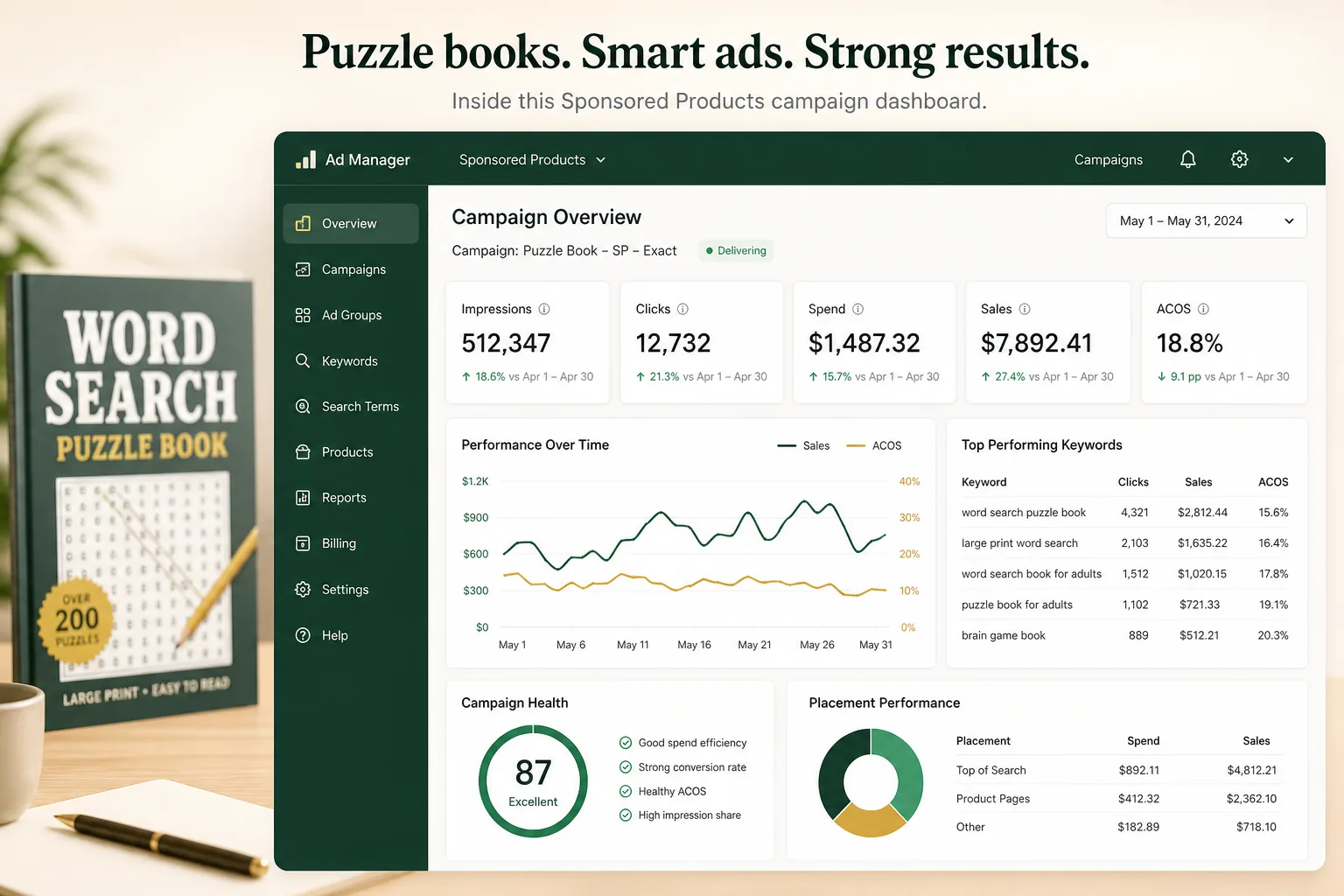
Amazon Ads for low-content and puzzle books work best as a launch plan after the listing can convert. This guide covers strategy: campaign types, bids, and early optimization. Build a tailored plan in the Amazon Ads tool, research bid phrases in the keyword research tool, and keep channel overview on the KDP marketing hub.
Amazon Ads are the fastest way to generate initial sales velocity for a new puzzle book, and initial sales velocity is what the Amazon algorithm needs to start ranking your book organically. Without ads in the first 30-60 days, your new title may sit at BSR 800,000+ indefinitely, invisible to buyers and unlearned by the algorithm.
The challenge for KDP puzzle book publishers is that ad ROI in the book category is thin. Royalties are $2-$5 per sale on most puzzle books. An ad campaign that costs $4.00 to generate one sale breaks even at best. The goal of your first ad campaign is not profit; it is data collection and organic ranking acceleration. Profit comes from the organic sales those initial ad sales enable.
This guide covers: how Amazon Ads work for KDP books, the three campaign types and which to use first, the beginner plan with exact setup instructions, how to read your first campaign data, when to cut, scale, or adjust, and the realistic 90-day trajectory.
See also: KDP title and subtitle formulas, puzzle book cover design for ads, and how BSR reflects ad-driven sales.
How Amazon Ads Work for KDP Books
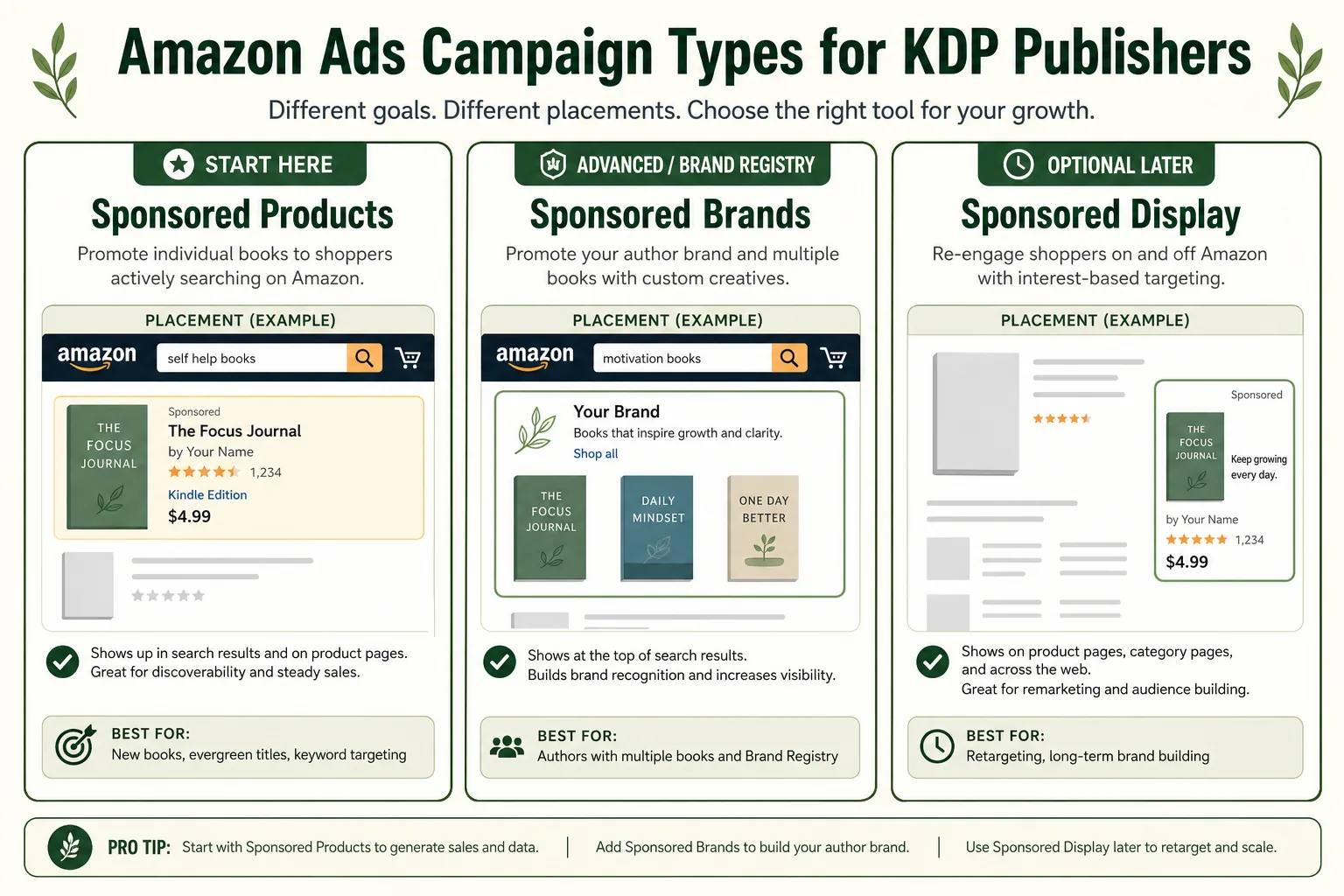
Amazon Advertising (Amazon Ads, previously AMS) offers three campaign types for book publishers:
Sponsored Products. Individual book ads that appear in Amazon search results and on product pages. Your book appears as a normal search result with a small "Sponsored" label. This is the primary ad format for KDP publishers and where you should start.
Sponsored Brands. Banner ads showing your brand logo and 3 book covers, appearing at the top of search results. Requires Brand Registry enrollment. Not available to standard KDP publishers without Brand Registry. Start with Sponsored Products first.
Sponsored Display. Ads shown on product pages, Amazon homepage, and off-Amazon placements. Interest-based and audience-based targeting. Useful as a supplementary channel once Sponsored Products are optimized. Not the right starting point.
This guide focuses exclusively on Sponsored Products, the right starting point for every new puzzle book publisher.
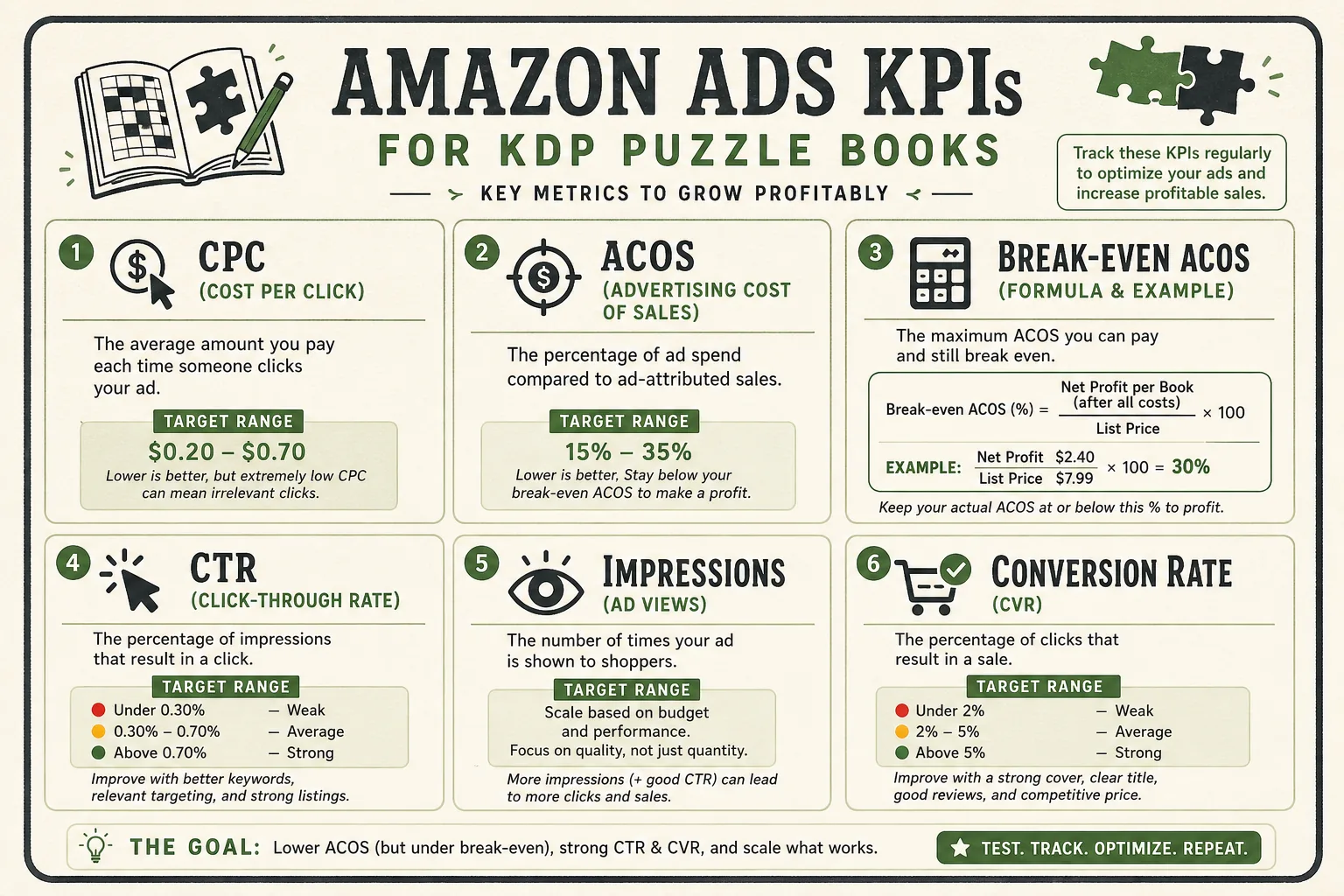
Key Metrics You Need to Understand
Before running a single campaign, understand these metrics:
CPC (Cost Per Click): What you pay each time a buyer clicks your ad. Amazon Ads use a second-price auction, you bid a maximum CPC and pay one cent more than the next-highest bid. For puzzle books, typical CPCs range from $0.10-$0.60 depending on keyword competition.
ACOS (Advertising Cost of Sales): Your ad spend divided by ad-attributed sales, expressed as a percentage. ACOS = Spend / Sales × 100. Example: $10 spend, $30 in sales = 33% ACOS.
Break-even ACOS: The ACOS at which your ad spend equals your royalty. If your royalty is $3.00 per sale and your list price is $9.99, break-even ACOS = $3.00 / $9.99 = 30%. Running below 30% ACOS means ads are profitable; above 30% means you're paying for ranking, not profit.
Impressions: How many times your ad was shown. Low impressions indicate your bids are too low or your targeting is too narrow.
CTR (Click-Through Rate): Impressions ÷ Clicks. Low CTR (under 0.3%) indicates your cover or title is not compelling to buyers at thumbnail size in the ad placement.
The Beginner Plan: Your First 30 Days
This plan assumes you have one published puzzle book with a complete listing (title, description, A+ Content) and want to generate your first sales and ranking data.
Week 1: Set Up Three Campaigns
Campaign 1. Automatic Targeting (Discovery)
Let Amazon's algorithm decide which keywords to show your ad for, based on your listing's metadata.
Setup:
Campaign type: Sponsored Products
Targeting: Automatic
Budget: $5/day
Bid strategy: Dynamic bids, down only (reduces bids when less likely to convert)
Default bid: $0.35
This campaign runs for 14 days without changes. It discovers which search terms Amazon associates with your book and which ones generate clicks and sales.
Campaign 2. Exact Match (Target Keywords)
Bid specifically on the exact phrases you know your buyers search for.
Setup:
Campaign type: Sponsored Products
Targeting: Manual, Keyword, Exact match
Budget: $5/day
Bid strategy: Fixed bids (gives you control over CPC)
Starting keywords (5-10 phrases):
For a crossword book example:
crossword puzzle book for adults
easy crossword puzzles adults
crossword book for seniors
large print crossword puzzles
crossword activity book adults
Starting bid: $0.30-$0.40 per keyword. Adjust based on impressions after 7 days.
Campaign 3. ASIN Targeting (Product Page Ads)
Show your ad on the product pages of your top competitor titles.
Setup:
Campaign type: Sponsored Products
Targeting: Manual, Product targeting, Individual ASINs
Budget: $3/day
Starting ASINs: The top 5-8 ASINs from your competitor research
This campaign puts your book directly in front of buyers who are already looking at books in your niche.
Total starting budget: $13/day (~$390/month). This is your data collection investment, not expected profit.
Week 2: Monitor Only
Do not change anything in week 2 except:
Pause any keyword with 10+ clicks and zero sales (burning money without converting)
Increase bids on keywords generating sales at ACOS below your break-even
Everything else: let it run. Seven days is not enough data to make strategic decisions. Resist the urge to adjust.
Week 3-4: First Optimization Cycle
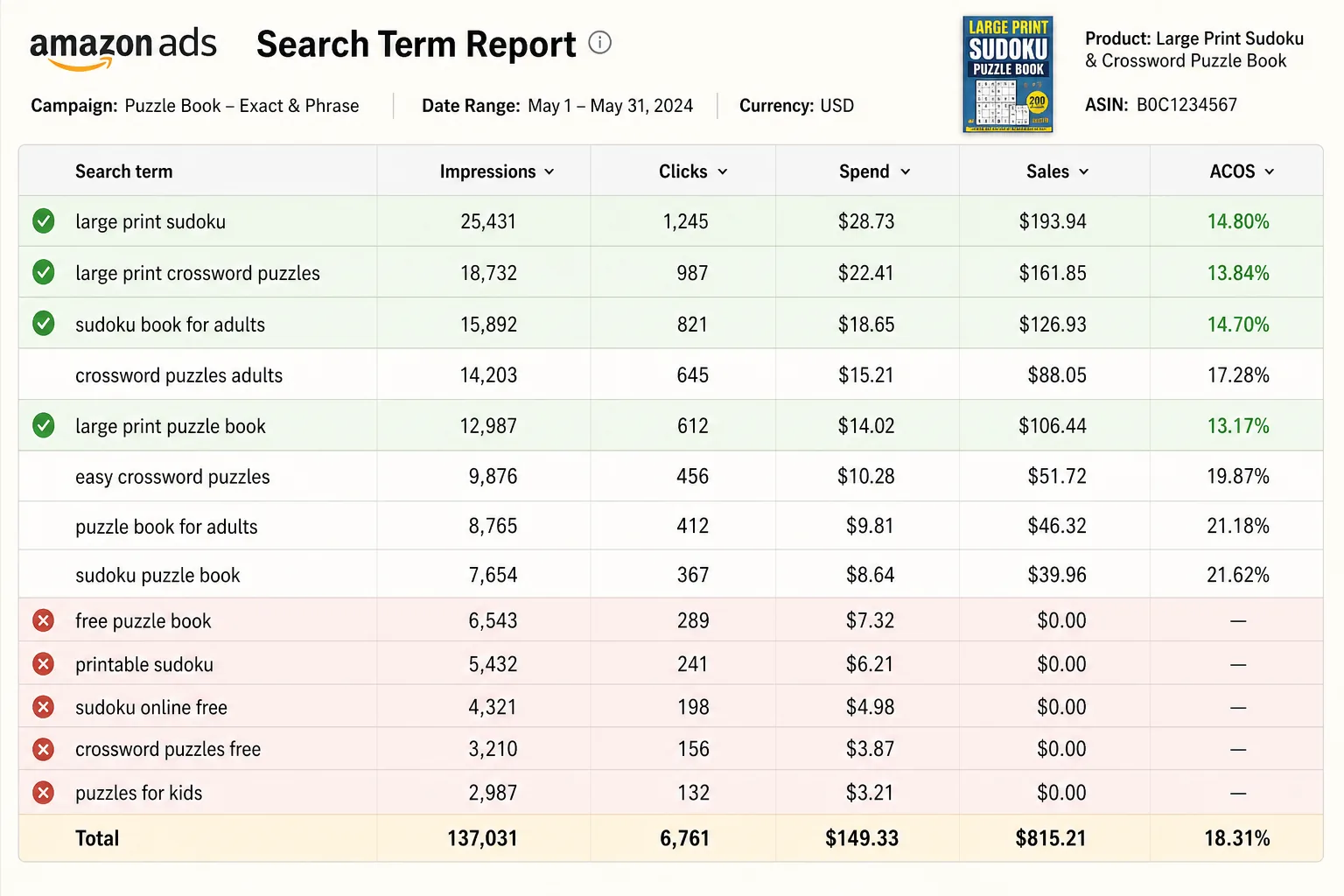
By day 14-21, your Automatic campaign has generated search term data. Export the Search Term Report:
In Amazon Ads Manager, click "Measurement & Reporting"
Select "Search Term Report"
Download for your Automatic campaign
From this report, identify:
Converting search terms (clicks that led to sales): Add these as exact-match keywords in Campaign 2 with a bid 10-20% higher than your auto campaign default
Wasted spend terms (many clicks, zero sales): Add these as Negative Exact match keywords in all campaigns to stop wasting budget on them
Budget Scaling Framework
Once your campaigns are generating data and you have identified converting keywords:
Phase 1 (Days 1-30): Data collection, $13/day Goal: Identify which keywords convert. Accept above-break-even ACOS as the cost of learning.
Phase 2 (Days 31-60): Efficiency, $8-10/day Move budget from Automatic (reduce to $3/day) to your optimized Manual Exact campaign (increase to $7/day). You now know which keywords convert, spend more on them. Goal: Push ACOS toward or below break-even while maintaining sales velocity.
Phase 3 (Days 61-90): Scale, increase as organic ranking improves As organic ranking improves from ad-driven sales history, your organic click rate increases. This means each dollar of ad spend now complements a growing organic baseline. Goal: Reduce ACOS below break-even. Begin generating profitable ad sales alongside organic.
Negative Keywords: Your ACOS Protection
Negative keywords tell Amazon not to show your ad for specific searches. They are as important as your positive keyword bids.
Always add negatives for:
Competitor author names and branded terms (buyers searching for a specific author are not looking for your book)
Irrelevant categories ("crossword pencils," "crossword software," "crossword maker app", buyers looking for tools, not books)
Geographic terms not relevant to your book
Children's terms if your book is for adults (or vice versa)
Build your negative list before launching: Research the most common search terms in your niche on Amazon autocomplete. Any term that returns results clearly unrelated to your specific book should be pre-loaded as a negative.
Puzzle Book Ad Copy: Your Cover and Title Are Your Ad
Unlike Google text ads, Amazon Sponsored Products ads do not have custom ad copy, your ad IS your book cover, title, rating, and price as they appear in the listing. This means:
Your cover must perform as an ad. If your cover does not convert browsers into clicks at thumbnail size, no amount of ad optimization will fix low CTR. Fix the cover first.
Your title must match the search intent. If a buyer searches "large print sudoku for seniors" and your title says "Sudoku Puzzle Book Vol. 1", the mismatch kills conversion even if your book appears. Title optimization and ad optimization are the same problem.
Your review count matters from day one. Even 5-10 reviews dramatically improve ad conversion rates. A book with zero reviews has a harder conversion curve against books with 50+ reviews at similar prices.
Realistic Expectations: 90-Day Trajectory
Days 1-30: Spending $300-400 on ads. Sales velocity begins. BSR moves from 500,000+ to 100,000-200,000. ACOS is likely 50-100% (you're paying for ranking, not profit). First 10-15 reviews may start accumulating.
Days 31-60: Organic ranking begins improving. Organic sales start supplementing ad sales. ACOS moves toward break-even. BSR reaches 50,000-100,000 for well-targeted niches. Total ad spend to date: $600-800.
Days 61-90: Organic sales may match or exceed ad sales for optimized keywords. ACOS drops below break-even. Daily organic revenue covers ad spend. BSR stabilizes in 20,000-80,000 range for successful launches. The book is now self-funding.
Investment to self-funding: $600-$1,000 in ad spend over 90 days is a realistic budget to get a well-produced, well-optimized puzzle book to organic self-funding in most niches.
Frequently Asked Questions
What daily budget should I start with for a new puzzle book?
$5-$15/day is the practical range for a new title. Below $5/day generates too little data too slowly. Above $15/day before you have converting keyword data wastes budget on unoptimized targeting. Start at $10-$15/day across 2-3 campaigns and optimize down as you identify waste.
How do I know if my ACOS is acceptable?
Calculate your break-even ACOS: Royalty / List Price. If your royalty is $3 and your price is $9.99, break-even ACOS is 30%. In the first 30 days, ACOS above break-even is acceptable (you're buying ranking). After 60 days, push ACOS toward or below break-even. After 90 days, above-break-even ACOS on any keyword means that keyword is not profitable for you, reduce bid or pause.
Should I run ads on all my series volumes simultaneously?
No, concentrate budget on Vol. 1. Once Vol. 1 gains organic ranking, it pulls buyers to the series page where Vol. 2+ are cross-sold without ad spend. Running ads across all volumes simultaneously spreads budget too thin and prevents any single volume from building sufficient momentum.
30-Day Ad Setup Checklist
Amazon Ads account activated (linked to KDP)
Campaign 1: Automatic ($5/day, $0.35 default bid)
Campaign 2: Manual Exact with 5-10 seed keywords ($5/day, $0.30-0.40 bids)
Campaign 3: ASIN targeting on 5-8 competitor ASINs ($3/day)
Negative keyword list built and loaded to all campaigns
Week 1-2: Monitor only (no bid changes)
Day 14: Search Term Report downloaded and analyzed
Converting terms added as Manual Exact keywords
Wasted terms added as Negative keywords
Break-even ACOS calculated and noted for ongoing reference