Amazon Search Suggestions for KDP Niche Keyword Research
How to research keywords for a Kindle niche with Amazon search suggestions: alphabet drill, demand checks, competition scoring, and a publishing roadmap for low-content books.
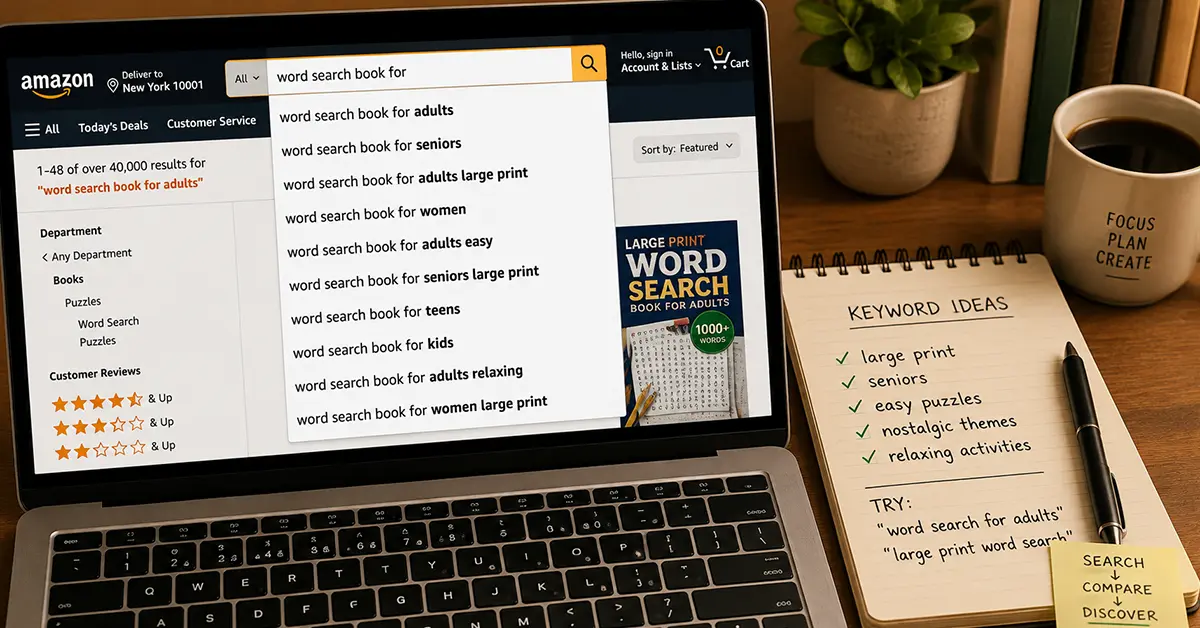
Learning how to research keywords for a Kindle niche starts with Amazon search suggestions. Expand phrases in the keyword research tool and paste backend slots using the backend keywords guide. Autocomplete shows real buyer phrasing you can turn into titles, subtitles, and backend keywords for low-content and puzzle books.
Amazon's search bar is the most underused niche research tool available to KDP publishers. It is free, always current, and directly reflects what real buyers are typing right now. Every suggestion it shows you is a validated search term with real demand behind it. Amazon's autocomplete algorithm only surfaces phrases that buyers actually use with meaningful frequency.
For low-content and puzzle book publishers, systematic Amazon search suggestion research is often more useful than paid keyword tools. It shows you not just what buyers search for, but how they phrase it, which maps directly to your title, subtitle, and backend keyword strategy.
This guide covers the complete method: how autocomplete works, how to extract every variation from a seed keyword, how to evaluate the suggestions you find, how to spot profitable sub-niches hiding inside broad categories, and how to use suggestion data to build a publishing roadmap.
See also: competition gaps in crowded niches, KDP keyword best practices, and from niche research to listing.
How Amazon Autocomplete Works (and Why It Matters for KDP)
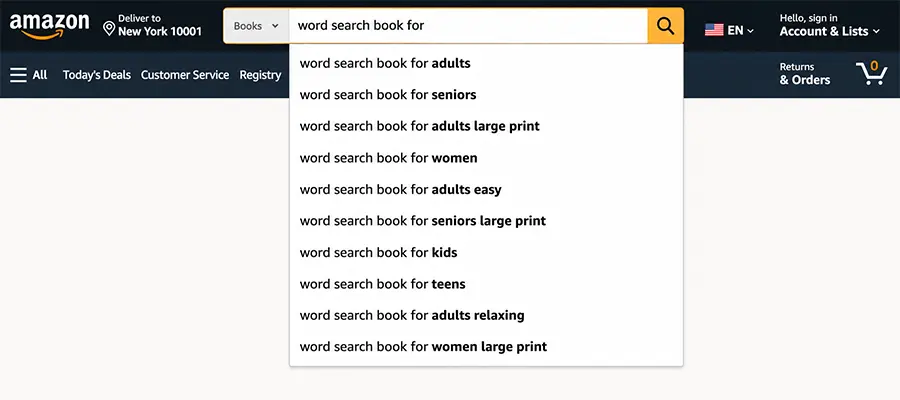
Amazon's autocomplete, the dropdown list of suggestions that appears as you type, is powered by real search data. Unlike Google's autocomplete (which blends query frequency with editorial curation), Amazon's search suggestions are almost entirely demand-driven. A phrase appears in the dropdown because a statistically significant number of shoppers have typed that exact phrase and then clicked a result.
What this means for KDP publishers:
- Every suggestion is a validated buyer intent signal
- The order of suggestions reflects relative search volume (higher positions = more searches)
- New suggestions appear as new demand patterns emerge
- Absent suggestions indicate low or no demand for that phrasing
What Amazon autocomplete does NOT show:
- Exact search volume numbers (you need a third-party tool for that)
- Click-through or conversion data
- Competition level (number of competing titles)
The research method below extracts as many suggestions as possible from a seed keyword, then uses secondary signals to estimate demand and competition.
The Systematic Extraction Method
Most publishers type one keyword and read the 8-10 suggestions that appear. That captures maybe 10% of available data. The systematic method extracts 10x more.
Step 1: Start with your seed keyword
Choose the broadest accurate descriptor for your product. For puzzle books, typical seeds:
word search booksudoku bookcrossword bookpuzzle book foractivity book
Type each seed into Amazon's search bar (set the department to "Books") and record all suggestions.
Step 2: Alphabet drill
After your seed keyword, type each letter of the alphabet to reveal suggestions beginning with that letter. This is systematic suggestion extraction.
Example: Seed = word search book
- Type "word search book a" → see suggestions containing "a" words (adults, activity, all ages...)
- Type "word search book b" → birds, beginners, big letters...
- Type "word search book c" → Christmas, cats, children...
- Continue through z
This method typically reveals 80-120 unique keyword phrases from a single seed.
Step 3: Modifier drilling
Also drill on common modifier words after your seed:
[seed] for→ audience modifiers (for adults, for seniors, for kids...)[seed] large→ large print, large grid, large format...[seed] easy→ easy for adults, easy for beginners, easy for seniors...[seed] hard→ hard for adults, hard brain teasers...
Each of these produces another cluster of suggestions.
Reading the Signals in Suggestions
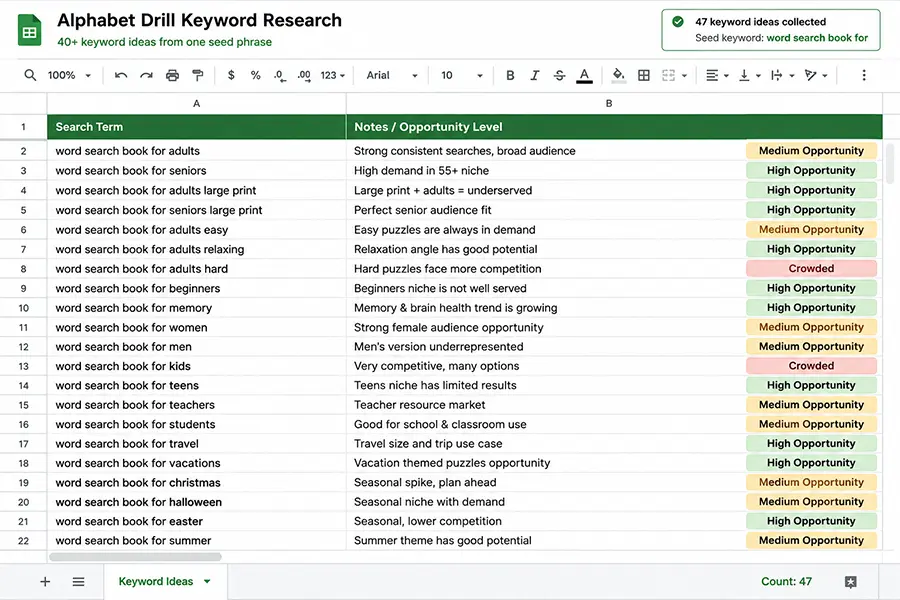
Not every suggestion is equally valuable. Learn to read the signals:
High-priority suggestions:
- Contain a specific audience modifier: "for seniors", "for kids age 8-12", "for adults"
- Contain a difficulty modifier: "easy", "hard", "large print"
- Contain a theme: "Christmas", "birds", "Bible"
- Are phrased as product claims: "with solutions", "large print", "200 puzzles"
Medium-priority suggestions:
- Generic audience without specificity: "for adults" without further modifier
- Broad theme without specific angle: "nature word search" (wide competition)
Low-priority suggestions:
- Single-word modifiers with no buyer intent signal
- Branded terms (competitor names, avoid building on these)
- Terms with no clear product match
The Golden Pattern: Specific Audience + Specific Theme:**
The most reliable high-converting suggestions combine audience and theme: "large print bird word search for seniors", "Christmas crossword puzzles for adults", "easy sudoku for beginners large print." These dual-specificity keywords indicate buyers with a precise need, and precise buyers convert better.
Evaluating Demand: From Suggestion to Sales Signal
A keyword appearing in autocomplete confirms search intent but not purchase volume. Use these secondary signals to estimate actual demand:
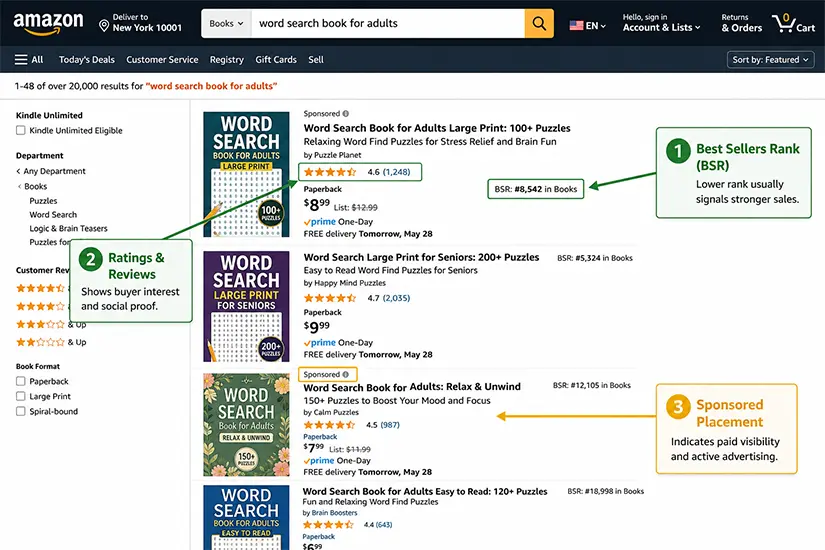
Signal 1: BSR of top results Search the keyword on Amazon Books. Look at the BSR of the #1 organic (non-sponsored) result. BSR under 50,000 = strong demand. BSR 50,000-200,000 = moderate demand. BSR above 200,000 = low demand or very new titles.
Signal 2: Review count and recency How many reviews does the top result have, and when was the most recent review posted? Recent reviews (within 30 days) on the top result confirm active buying. Old reviews on a top result (last review 6+ months ago) may indicate demand has waned or the niche is stagnant.
Signal 3: Number of sponsored results If the first 3-4 results are all sponsored (Sponsored label visible), advertisers are paying to appear, which means they are converting profitably. Multiple advertisers = validated commercial demand.
Signal 4: Price floor What is the lowest price on the first page of results? If multiple titles price at $7.99+ with decent reviews, the niche supports commercial pricing. If most titles are priced under $4.99, it is a discount-commoditized niche with thin margins.
Evaluating Competition: Finding the Entry Gap
High demand alone is not enough. You need to find demand where competition has left a gap. Look for:
Gap Signal 1: Low average review count on the first page If the 10 first-page results average under 100 reviews, the niche is winnable with a quality title and good initial launch strategy.
Gap Signal 2: Low-quality top results If the #1 or #2 result has a poor cover, a generic title, a sparse description, or few reviews despite ranking, it is holding a position on momentum rather than quality. You can displace it with a better product.
Gap Signal 3: Outdated titles If the most recent publish date on first-page results is 2+ years ago, the niche has demand but no active publishers. Fresh titles with current keyword optimization can rank quickly.
Gap Signal 4: Missing sub-niches The first page ranks generic titles (e.g., "word search for adults") but not specific variants (e.g., "bird word search for adults"). Themed sub-niches are often invisible in the first page even when they have buyers actively searching, because no one has published a well-optimized title yet.
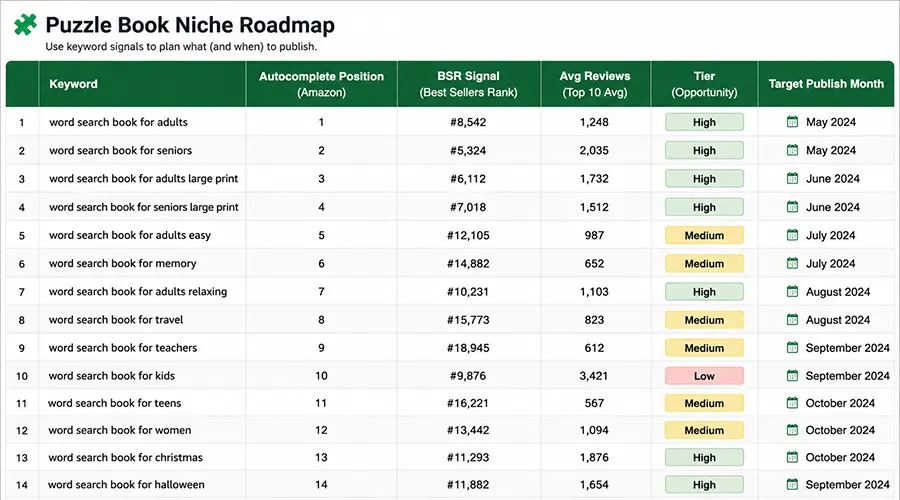
From Suggestions to a Publishing Roadmap
Once you have extracted and evaluated 80-150 keyword phrases, group them into publishing opportunities:
Tier A: Publish immediately:
- High-frequency autocomplete position (top 3)
- BSR signal: top result under 50,000
- Low average reviews on page one (under 150)
- Clear audience + theme combination
Tier B: Publish in months 2-3:
- Mid-frequency autocomplete position (4-8)
- BSR: top result 50,000-150,000
- Moderate reviews
- Solid demand with acceptable competition
Tier C: Monitor and revisit:
- Low autocomplete frequency
- Thin BSR signal
- High competition or low quality signal unclear
Build your first 3-6 months of publishing from Tier A opportunities. Use Tier B for your month 4-8 pipeline. Revisit Tier C every quarter, niches that are borderline today may become Tier A as demand grows or dominant titles age out.
Practical Shortcuts and Tools
Amazon search on mobile: Amazon's mobile app sometimes shows different suggestions from the desktop browser. Run your alphabet drill on both for additional coverage.
Incognito / private browsing: Amazon personalizes some suggestions based on browsing history. Run your research in a private/incognito window to get unpersonalized results.
Regional variation: Amazon.co.uk and Amazon.ca show different autocomplete suggestions from Amazon.com. If you publish globally, run your drill on each marketplace for regional niche opportunities.
RodBooks Niche Finder: RodBooks Niche Finder tool pulls Amazon data to help validate demand signals and surface sub-niche opportunities without manual drilling.
Frequently Asked Questions
Does Amazon autocomplete show the same results everywhere?
No. Suggestions are personalized by browsing history, location, and device. Always research in incognito mode on a desktop browser set to your target marketplace (amazon.com for the US market) for the most representative data.
How often do I need to redo my keyword research?
Quarterly is a reasonable cadence for an active publisher. Amazon's autocomplete reflects current demand, which shifts with seasons, trends, and competitor activity. Niches you evaluated as low-priority six months ago may now be Tier A.
Should I use Amazon autocomplete or paid keyword tools?
Both have value. Amazon autocomplete gives you buyer-intent phrasing in real language that translates directly to title copy. Paid tools (like RodBooks Keyword Research or Publisher Rocket) add volume estimates and competition scoring. Start with autocomplete for direction; validate with paid tools before committing production time.
What is the alphabet drill and how long does it take?
The alphabet drill means typing your seed keyword followed by each letter (a through z) and recording the autocomplete suggestions. For one seed keyword, it takes 10-15 minutes. For a full niche audit across 4-5 seeds, allow 60-90 minutes. The resulting keyword list of 150-300 phrases is significantly more valuable than the 8-10 suggestions most publishers stop at.
Research Checklist
- 3-5 seed keywords identified for your niche
- Alphabet drill run for each seed (incognito, amazon.com Books)
- Mobile autocomplete checked for any additional suggestions
- All suggestions recorded in a spreadsheet with notes
- Top 3 results for each high-priority suggestion checked for BSR, review count, and recency
- Tier A/B/C classification applied to each opportunity
- Publishing roadmap built from Tier A priorities