How to Write Backend Keywords for Puzzle Books (7-Slot Examples)
Fill Amazon KDP seven backend keyword fields for puzzle books with real word search, sudoku, crossword, and maze examples, plus rules, workflows, and a generator tool.
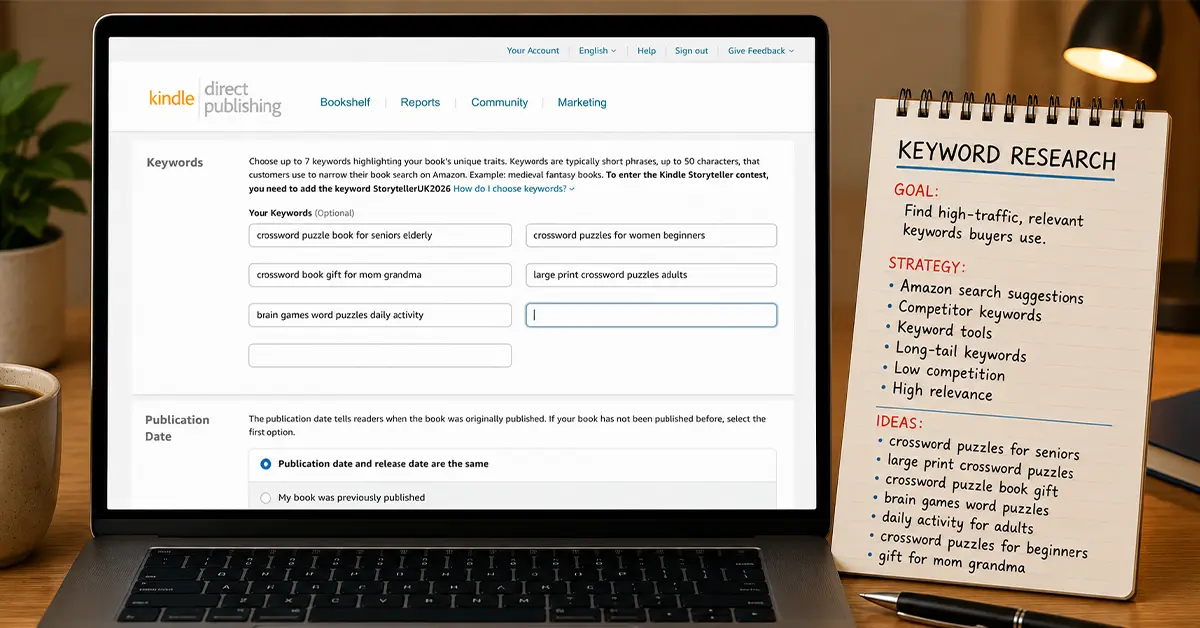
KDP backend keywords for puzzle books are invisible to shoppers but indexed by Amazon. This guide shows how to fill all seven backend keyword slots with coherent phrases, what Amazon prohibits, and complete examples for crossword, sudoku, word search, and maze books. Find seed phrases with Amazon search suggestions for low-content niches, then paste ready slots from the backend keywords tool.
Backend keywords are the most misunderstood element of Amazon KDP listing optimization. They are not visible to buyers, but they are indexed by Amazon's A9 search algorithm, which uses them (alongside your title, subtitle, and description) to decide when to show your book in search results.
Most KDP publishers either ignore backend keywords entirely, fill them with obvious words already in their title, or use them to stuff in a random list of vague terms that Amazon cannot map to buyer intent. All three approaches waste the most direct lever you have over your book's search indexing.
This guide covers exactly how backend keywords work, what KDP allows and prohibits, the complete strategy for filling all 7 slots efficiently, and specific examples for crossword, sudoku, word search, and maze books.
See also: KDP keyword compliance rules, title and subtitle keyword alignment, and description HTML structure.
How Amazon Indexes Backend Keywords
Amazon's A9 algorithm processes backend keywords as part of your book's indexing data. When a buyer searches for a phrase, Amazon's algorithm looks across your title, subtitle, author name, description, and backend keywords to determine relevance.
Key technical facts:
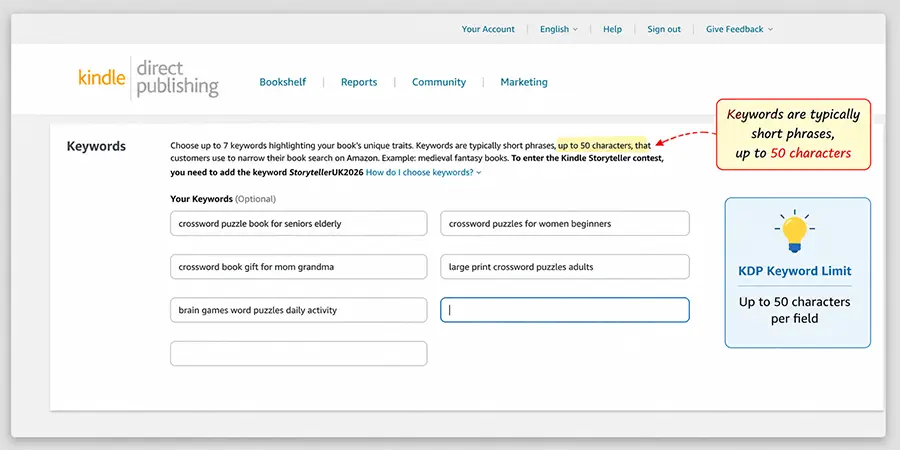
7 keyword fields, up to 50 characters each. KDP gives you 7 separate input rows, each accepting up to 50 characters. Total: 350 characters of indexing data. This is not a lot; every character must work.
Keywords are phrase-indexed, not word-indexed. Amazon indexes keyword fields as phrases, not just individual words. "large print crossword puzzles" entered in one field will index you for "large print crossword puzzles" as a phrase AND for the individual words "large", "print", "crossword", "puzzles."
No need to repeat words from your title. Your title and subtitle are already indexed. Putting "crossword puzzle book" in your backend keywords if it is already in your title wastes 22 characters on redundant indexing.
Spaces between words, not commas. KDP instructs you to separate keywords with spaces, not commas. "large print sudoku for seniors" is one keyword phrase. Do not write "large print, sudoku, for seniors", the comma becomes part of the indexed text.
Amazon prohibits certain content in keywords (covered in detail below).
What KDP Prohibits in Backend Keywords
Amazon's guidelines explicitly prohibit the following in keyword fields:
- Competitor names or ASINs (e.g., "like Will Shortz crosswords", not allowed)
- Trademarked terms you don't own (e.g., brand names)
- Subjective quality claims ("best", "#1", "top-rated")
- Temporary time-based claims ("new", "on sale", "this year")
- Irrelevant keywords not related to the product
- Profanity or offensive terms
Violating these guidelines can cause your listing to be removed or your account to be flagged. Stay with descriptive, factual, audience-relevant phrases.
The 7-Slot Strategy Framework
With only 7 slots of 50 characters each, treat each slot as filling a distinct strategic purpose.
Slot 1. Primary audience variant not in title
If your title says "for adults," your backend should cover "for seniors", "for elderly", "for men", or other audience variants you couldn't fit.
Slot 2. Primary theme variant not in title
If your title has one theme, cover adjacent themes. If title says "bird word search", backend covers "nature word search", "animal word search", "wildlife puzzle book".
Slot 3. Gifting and occasion phrases
"gift for grandma", "birthday gift puzzle book", "mothers day gift activity book". These are high-intent gift buyer searches that don't appear in most titles.
Slot 4. Format and accessibility variants
"large print", "big letters", "easy to read", "large grid". These are frequently searched modifiers that don't fit in every title.
Slot 5. Activity and use-case phrases
"brain games adults", "daily puzzle activity", "travel puzzle book", "rainy day activity". These describe how buyers use the product.
Slot 6. Series and volume phrases
"puzzle book series", "volume 1 puzzle", "book 1 activity". If you have or plan a series, this helps buyers find all volumes.
Slot 7. Wild-card / long-tail
Your best long-tail phrase from keyword research that doesn't fit elsewhere. Often the most specific and highest-converting slot.
Complete Keyword Examples by Puzzle Type
Use these as templates. Replace bracketed terms with your specifics.
Crossword Puzzle Books, 7 Backend Keywords
For a title like: Easy Crossword Puzzles for Adults Vol. 1, 60 American-Style Puzzles with Solutions
| Slot | Keyword Phrase | Notes |
|---|---|---|
| 1 | crossword puzzle book for seniors elderly | Audience not in title |
| 2 | crossword puzzles for women beginners | Alternate audience |
| 3 | crossword book gift for mom grandma | Gift buyer search |
| 4 | large print crossword puzzles adults | Format variant |
| 5 | brain games word puzzles daily activity | Use-case phrases |
| 6 | crossword books series volume easy | Series buyer |
| 7 | american crossword grid standard style | Long-tail format |
Sudoku Books, 7 Backend Keywords
For a title like: Large Print Sudoku for Seniors Vol. 1, 100 Easy Puzzles with Solutions
| Slot | Keyword Phrase | Notes |
|---|---|---|
| 1 | sudoku puzzle book easy for older adults | Audience variant |
| 2 | sudoku puzzles for women relaxation | Different audience angle |
| 3 | sudoku gift book for grandpa birthday | Gift male senior |
| 4 | big print 9x9 sudoku book easy | Format specificity |
| 5 | daily brain activity book logic puzzles | Use-case |
| 6 | sudoku book series volume 1 2 3 | Series discovery |
| 7 | senior activity book mental stimulation | Adjacent category |
Word Search Books, 7 Backend Keywords
For a title like: Large Print Bird Word Search for Seniors, 60 Nature Puzzles
| Slot | Keyword Phrase | Notes |
|---|---|---|
| 1 | word search book seniors elderly large print | Audience + format |
| 2 | bird watching word search nature puzzle | Theme variant |
| 3 | word search gift for grandma activity | Gift angle |
| 4 | easy word search big letters readable | Accessibility |
| 5 | word find puzzle book relaxing brain | Use-case |
| 6 | word search series book volume 1 | Series |
| 7 | nature wildlife bird puzzle activity book | Long-tail theme |
Maze Books, 7 Backend Keywords
For a title like: Hard Maze Book for Adults Vol. 1, 100 Challenging Puzzles
| Slot | Keyword Phrase | Notes |
|---|---|---|
| 1 | maze puzzle book for men women adults | Broad adult audience |
| 2 | complex maze activity book challenging | Difficulty variant |
| 3 | maze book gift adults birthday | Gift phrase |
| 4 | brain teasers spatial reasoning puzzles | Category crossover |
| 5 | activity book boredom buster adults | Use-case |
| 6 | maze book series volume hard | Series |
| 7 | problem solving logic activity puzzle adults | Long-tail |
Advanced Strategies
Mine your own title for coverage gaps. After writing your title and subtitle, list every word in them. Then ask: what related phrases are NOT covered? Those are your backend keyword candidates.
Use plural and singular forms. Amazon sometimes indexes both, but including both covers edge cases. "puzzle book" and "puzzle books" can be in separate slots if space allows.
Think about intent, not just keywords. "Gift for a puzzle lover" targets gift-buyer intent. "Brain games for adults" targets the self-purchaser searching by activity category. "Activity book for retirement" targets a use case. Cover multiple intent categories across your 7 slots.
Avoid keyword stuffing in a single slot. "crossword sudoku word search maze puzzle books activity" in one slot looks spammy and Amazon's algorithm may discount it. Use coherent phrases, not keyword lists.
Check your competition's listing copy. Look at the description and A+ content of your top-ranking competitors. They often use phrases in their visible copy that indicate what keywords they are targeting. These can inform your backend slots.
Update backend keywords based on data. After 30-60 days, check your KDP sales dashboard and Amazon Ads search term report (if running ads). If certain search terms are converting well in your ad data, make sure they are also in your backend keywords.
How RodBooks Backend Keyword Tool Helps
RodBooks Backend Keywords tool analyzes your book's category, audience, and title to suggest keyword phrases calibrated for KDP indexing, covering audience variants, gift phrases, format modifiers, and long-tail opportunities you might miss manually.
Generate your backend keyword list →
Frequently Asked Questions
Should I put commas between my keywords?
No. KDP's instructions say to separate keywords with spaces, not commas. Each field should contain one keyword phrase as a natural-language string: "large print sudoku for seniors". Commas become part of the indexed text.
Can I use the same word in multiple keyword slots?
Technically yes, but it wastes valuable space. Amazon indexes words individually once they appear anywhere in your metadata. If "sudoku" is already in your title, you do not need it in your backend. If you need "sudoku" in a backend phrase, one occurrence across all 7 slots is sufficient.
How long should each backend keyword phrase be?
Use the full 50 characters whenever you have meaningful content to fill them. Short keywords waste space. A 50-character phrase like "large print sudoku book for seniors older adults" covers multiple relevant words efficiently.
Should I use quotes around phrases in KDP keywords?
No. KDP does not use quote-based phrase matching in backend keyword fields. Enter keywords as plain text phrases.
How often should I update my backend keywords?
Review them every 60-90 days. Update based on: new keyword research (Amazon autocomplete results you have found), ad campaign data (search terms that converted), seasonal relevance, or if your BSR is declining without an obvious reason.
Backend Keyword Checklist
- No words duplicated from your title or subtitle
- All 7 slots filled (no empty slots, every character matters)
- Each slot contains a coherent phrase, not a keyword dump
- At least one gift-intent phrase included
- At least one format/accessibility variant included (large print, etc.)
- No competitor names, trademarks, or prohibited claims
- Long-tail audience-specific phrase in at least one slot
- Seasonal or themed phrases included if relevant