How to Choose Amazon Categories for Low-Content Books: The Complete Guide
Choose Amazon KDP categories for low-content and puzzle books strategically: browse paths, competition, and Category Finder workflow.
KDP categories for low-content books should match the puzzle type and audience on the cover. Run ranked browse paths in the free KDP category finder, then validate demand with BSR explained for puzzle publishers.
Categories are an important part of Amazon discoverability. Along with keywords, book metadata, relevance, and sales performance, they help Amazon understand where your book belongs and how readers may discover it. They influence where your book may appear in Amazon’s browse structure and which category bestseller lists it may be eligible to rank in. A relevant and competitive category can also improve your chances of earning a Best Seller badge.
For low-content and puzzle book publishers, category selection is both more strategic and more flexible than most publishers realize. You can choose categories that are accurate, searchable, and achievable for a new title, rather than defaulting to the broadest possible category where you will never rank.
This guide covers: how KDP's category system works, the category slots you get and how to use them, which categories work for each puzzle type, the "Best Seller badge" strategy, and how RodBooks Category Finder helps you pick paths that match your book.
See also: competition gaps research, Amazon search suggestions method, and series category consistency.
How KDP's Category System Works
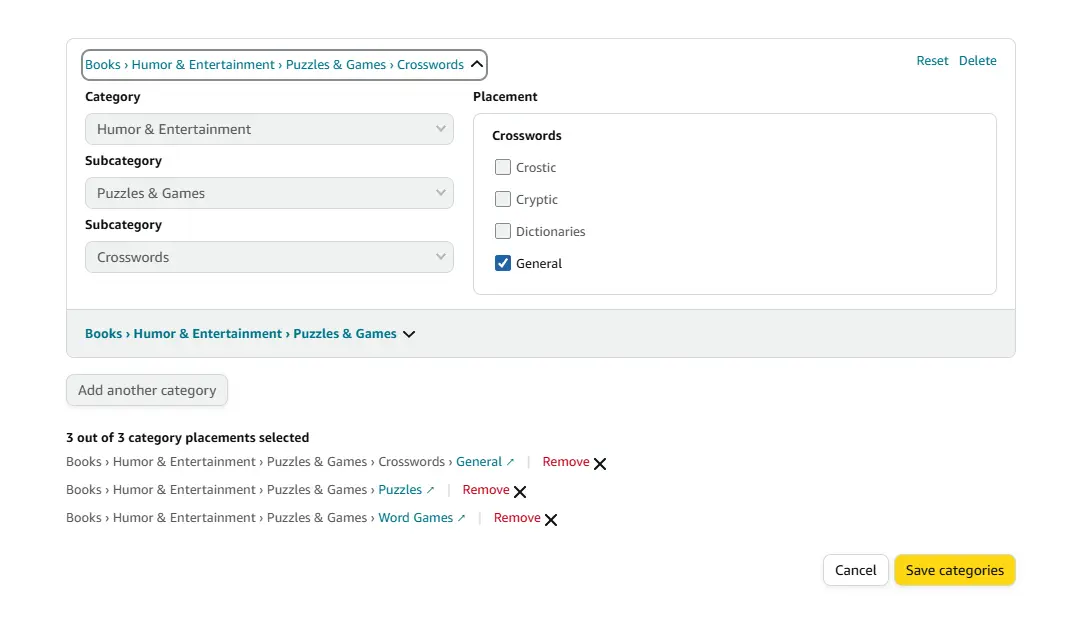
Primary categories (setup slots): During the KDP book setup process, you can choose the available category options that best describe your book. These selections help Amazon classify the book and determine relevant browse placements.
Amazon browse placements: The categories you select in KDP help Amazon understand where your book belongs. Amazon may use your selected categories, book metadata, keywords, and marketplace-specific category mapping to determine additional relevant browse placements. The categories shown on an Amazon product page may therefore differ from the exact selections you made during setup.
Category mapping: Amazon’s category mapping is not always a direct one-to-one match. A category selected during KDP setup may be mapped to a broader or different Amazon browse path depending on the marketplace and the book’s metadata.
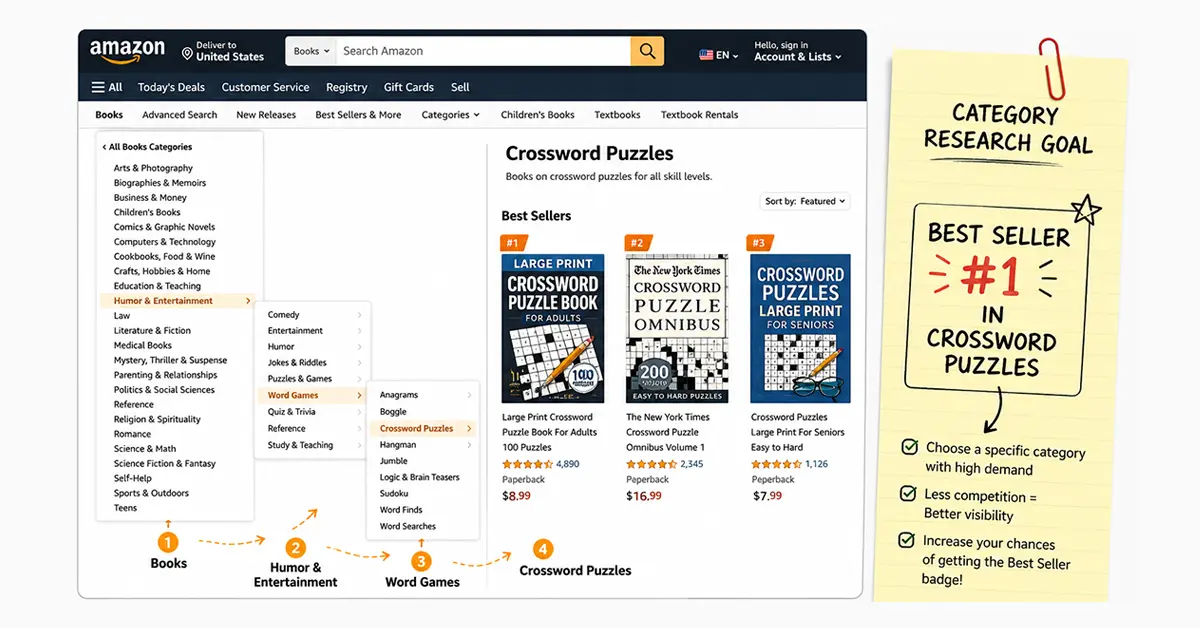
Sub-category depth matters: Avoid selecting top-level categories like "Books > Humor & Entertainment." Instead, drill to the deepest relevant sub-category: "Books > Humor & Entertainment > Word Games > Crossword Puzzles." The deeper and more specific the category, the easier it is to rank and earn a Best Seller badge.
Why Sub-Category Ranking Matters More Than You Think
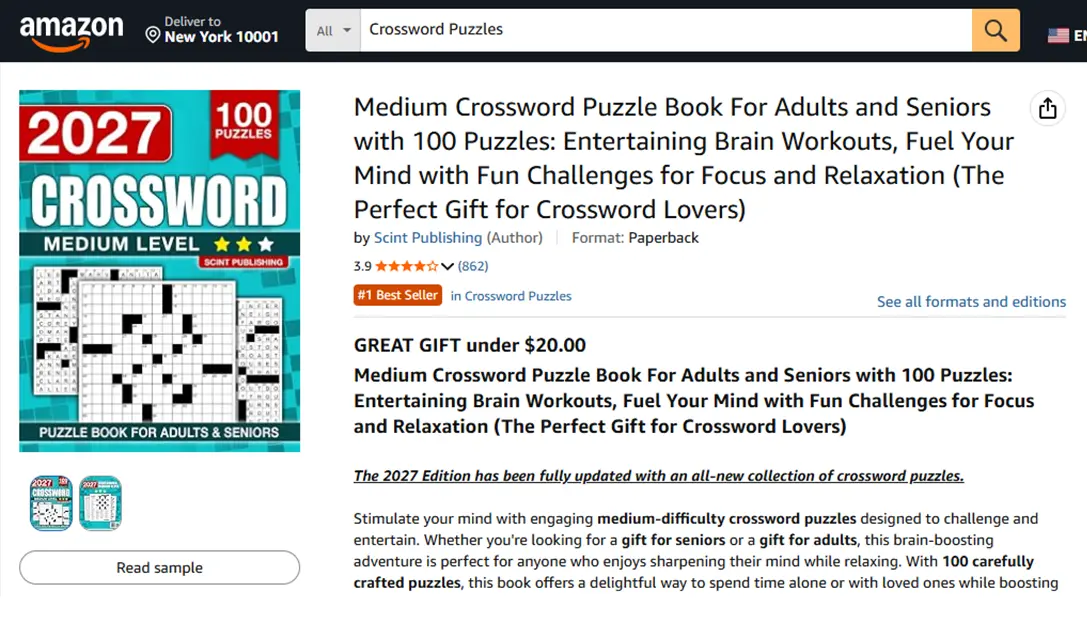
A book ranked #1 in "Crossword Puzzles" displays a bright orange "Best Seller" badge on its Amazon listing. This badge is visible in search results, on the product page, and even in Amazon's promotional emails. The badge can make a book more noticeable in search results and on product pages, which may improve visibility and buyer confidence. However, the impact varies by audience, category, competition, and marketplace.
The key insight: a strong rank in a narrow, relevant sub-category can matter more for visibility than a mid-range rank across all Books. You do not need to outsell millions of books; you need to compete effectively within your specific sub-category.
Example: A book may have a relatively modest overall Amazon Best Sellers Rank while ranking highly in a smaller, highly relevant category. The sales volume required to reach the top of a category varies over time and depends on the marketplace, competition, recent sales activity, and the category itself.
The Best Categories by Puzzle Type
Use the first slot for the most specific, directly relevant category. Use the second slot for a secondary access point, often a broader or adjacent category. Use your available KDP category selections strategically. Choose the most specific and accurate category first, then use the remaining selection to cover another relevant discovery path. The number of category placements displayed on Amazon may vary by marketplace and Amazon’s category mapping.
Crossword Puzzle Books
Primary category:
Books > Humor & Entertainment > Word Games > Crossword Puzzles
Secondary category options (choose one based on audience):
Books > Crafts, Hobbies & Home > Crafts & Hobbies > PuzzlesBooks > Humor & Entertainment > Word Games(if crossword sub-category is unavailable in your KDP list)
If your book is designed for a specific audience, such as seniors, or includes features such as large print, make those characteristics clear in the title, subtitle, description, keywords, and book metadata where appropriate.
Sudoku Books
Primary category:
Books > Humor & Entertainment > Word Games > Sudoku
Secondary options:
Books > Crafts, Hobbies & Home > Crafts & Hobbies > Puzzles
If your book is designed for a specific audience, such as seniors, or includes features such as large print, make those characteristics clear in the title, subtitle, description, keywords, and book metadata where appropriate.
Word Search Books
Primary category:
Books > Humor & Entertainment > Word Games > Word Search
(or the closest Word Games / Activity Books path available in your KDP dropdown)
Secondary options:
Activity Books for kids or all-ages editions
If your book is designed for a specific audience, such as seniors, or includes features such as large print, make those characteristics clear in the title, subtitle, description, keywords, and book metadata where appropriate.
Maze, Coloring, Journals & Workbooks
Match the deepest accurate path: Activity Books, Coloring Books, Journals, or Educational Workbooks. Prefer specificity (audience + format) over a broad "Books" parent node.
The Best Seller Badge Strategy
The Best Seller badge is earned by having the highest sales velocity in a sub-category at any given time. It can be lost and regained as competitors' sales fluctuate.
To engineer a Best Seller badge:
Research relevant categories and compare the overall BSR of the leading books over several days. This can help you estimate the level of competition, but a single BSR snapshot should not be treated as a fixed sales target.
Set your book's primary or secondary category to that sub-category.
Run a short Amazon Ads campaign at launch targeting exact-match keywords to generate initial sales velocity.
Monitor your category rankings and sales performance regularly after launch, then adjust your category strategy when relevant options become available.
Category strategy for a realistic Best Seller opportunity:
Look for the deepest accurate category available for your book. A narrow category may have less competition than a broad parent category, but it must genuinely match the book’s content, format, and audience. Do not choose a category only because it appears easier to rank in.
Using RodBooks Category Finder
RodBooks Category Finder is built for this exact workflow. Enter your book title, book type (word search, crossword, sudoku, activity book, coloring book, journal, workbook, or other), target audience, and an optional description. The finder returns:
Recommended categories for your primary slots, each with a full Amazon browse path you can copy
Alternative categories for your remaining slot
Competition notes (low / medium / high) and a relevance score
Publisher tips for placement strategy
Use the recommended pair first, then pick one alternative that opens a different discovery path without misrepresenting the book.
Find your optimal categories →
Frequently Asked Questions
Can I change my KDP categories after publishing?
You can update your category selections through your KDP dashboard when the relevant options are available. After making changes, allow time for Amazon to process the update and refresh the book’s browse placements.
How many categories can a KDP book appear in?
The category selections available during KDP setup and the browse placements displayed on Amazon are not always the same. Amazon may map a book to additional relevant browse placements, and the result can vary by marketplace and category mapping.
Does being in more categories always help?
More relevant category placements can create additional discovery opportunities, but more is not automatically better. Relevance is more important than quantity. Every category should accurately represent the book’s content, format, and intended audience.
How does Category Finder choose paths?
It matches your title, book type, audience, and description to realistic Amazon browse paths, then ranks suggestions with relevance and competition context so you can fill your slots intentionally.
Category Selection Checklist
Primary category drills to the deepest relevant sub-category
Secondary category covers a different discovery path (different audience or use case)
Both categories are accurate to the book's actual content
Book metadata clearly communicates the format, audience, and main puzzle type
Leading books in relevant categories have been researched over time, not through a single BSR snapshot
Category performance is reviewed periodically using relevance, rankings, sales data, and available KDP options
Paths copied from RodBooks Category Finder and verified in KDP before publish