How to Launch a Puzzle Book Series on Amazon KDP
How to launch a puzzle book series on Amazon KDP: design system, release timing, series page linking, pricing, and launch checklist.
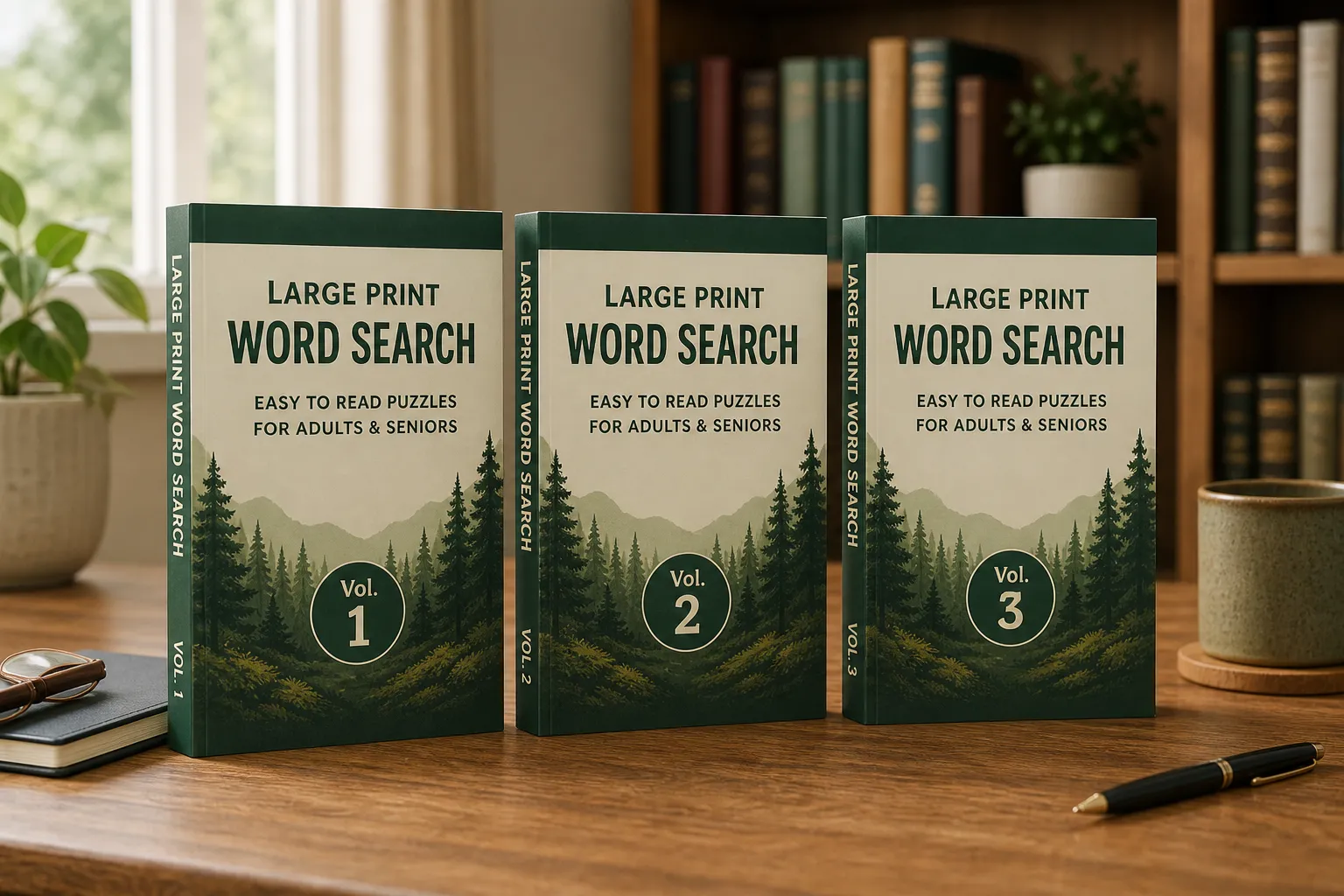
How to launch a puzzle book series on Amazon KDP starts before Volume 1: lock branding, title pattern, trim, and release timing so every volume looks related. Pair this plan with the niche-to-listing one-week workflow and Amazon Ads for puzzle books when Volume 1 is ready for traffic.
A single puzzle book earns linear revenue. A series earns compounding revenue. Every volume you add creates a new organic search entry point, cross-sells the other volumes to every buyer, and builds brand recognition that makes each subsequent launch easier than the last.
Most KDP publishers understand this in principle but execute it incorrectly in practice. They publish Vol. 1, wait to see if it sells, then eventually publish Vol. 2 with different branding and a different title format. The series never coheres. Buyers who loved Vol. 1 cannot find Vol. 2 because it looks like a different product.
This guide covers the complete series launch strategy: how to design a series before publishing Vol. 1, when to publish each volume, how to cross-link volumes to drive series discovery, the most important series branding decisions, and how to scale from 3 volumes to 20.

See also: series title formulas, matching cover design across volumes, and seasonal release calendar.
Design the Series Before Publishing Vol. 1
The single biggest series mistake: publishing Vol. 1 without a defined series system. Every decision you make for Vol. 1 becomes a constraint for every subsequent volume. Change it mid-series and you lose visual continuity.
Before publishing your first volume, define:
1. Series name: The overarching brand for your series. This appears on covers, in titles, and in Amazon's "Books in this series" section. Examples: "Clarity Crossword Series," "Peak Mind Sudoku," "Sunrise Word Search Collection." Once set, do not change it.
2. Title formula: The exact template every volume title will follow. "Easy Crossword Puzzles for Adults, Vol. [N]: [Count] [Style] Challenges." Every volume uses the same formula; only the volume number and subtitle details change.
3. Cover design system: The visual template. Same color palette, same typography, same layout. Differentiated only by volume number (and optionally a slight color accent variation by difficulty). A buyer who sees Vol. 3 in search results should instantly recognize it as part of the series from Vol. 1.
4. Trim size: Locked from Vol. 1. Never change trim size mid-series.
5. Puzzle count per volume: Aim for consistency. Vol. 1 has 100 puzzles; Vol. 2 should have 100 puzzles. Buyers notice volume count changes and comment in reviews.
The Series Launch Sequence
The timing of your volume releases directly affects series momentum and Amazon's series algorithm recognition.
Phase 1: The Foundation (Vol. 1 + Vol. 2 within 60 days)
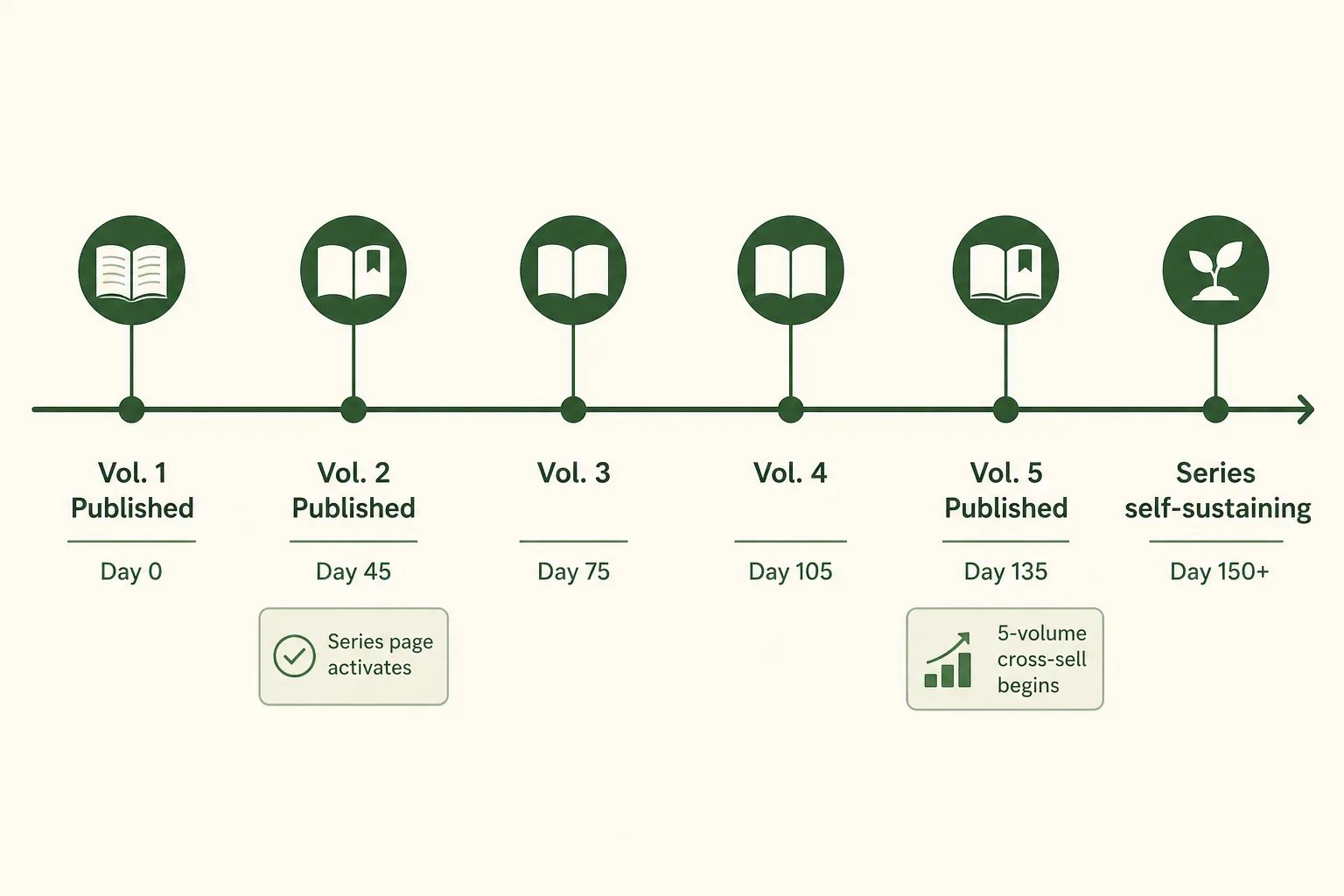
Publish Vol. 1. Begin immediate production on Vol. 2. Publish Vol. 2 within 45-60 days of Vol. 1.
Why 60 days matters: Amazon's "Books in this series" feature requires multiple volumes to display as a series. A single-volume "series" shows no cross-sell section. Vol. 2 activates the series page and creates cross-sell momentum for both volumes simultaneously.
Buyers who purchase Vol. 1 during the first 60 days are your earliest adopters. They are actively looking for Vol. 2 when it becomes available. A 90-day gap between Vol. 1 and Vol. 2 loses most of this buyer momentum.
Phase 2: The Critical Mass (Vol. 3-5, monthly cadence)
Once Vol. 1 and Vol. 2 are live, maintain a monthly publishing cadence: one new volume every 4-6 weeks.
Why monthly cadence matters:
- Each new volume triggers Amazon to email existing series buyers ("New in a series you follow")
- Monthly new volumes signal an active publisher to Amazon's algorithm
- The series page grows, creating an increasingly powerful cross-sell asset
- Your catalog reviews and BSR data accumulate, improving organic ranking for all volumes
At 5 volumes, your series has enough depth that buyers who discover any single volume have 4 other immediate purchase options. At 10 volumes, the series becomes self-sustaining. Organic discovery from multiple volumes creates daily sales across the catalog.
Phase 3: Scale and Diversify (Vol. 6+)
After 5+ volumes in your core series, introduce adjacent series:
- A large-print variant series (same puzzle type, larger format)
- A difficulty progression series (Easy → Hard as separate series with cross-linking)
- A themed sub-series (Nature Word Search, Holidays Word Search, as separate branded collections under the same publisher brand)
Each new series compounds on the brand equity of the original.
Setting Up the Amazon Series Page
Amazon automatically creates a series page when:
- Multiple books are enrolled in the same series
- The series name is consistent across all volumes
How to set up your series in KDP:
- In your KDP book setup (Book Details step), find the "Series" section
- Enter your series name exactly as it will appear across all volumes
- Enter the volume number (1, 2, 3...)
- Repeat this for every volume, using the exact same series name every time
Critical: The series name must be character-for-character identical across all volumes. "Clarity Crossword Series" and "Clarity Crossword series" (lowercase 's') are treated as different series. Amazon will not aggregate them.
The series page shows:
- All volumes in sequence
- Each volume's cover, title, price, and review count
- An "About this series" description (you can customize this)
- A "Follow this series" button (buyers get notified of new volumes)
Cross-Linking Strategy: Driving Discovery Between Volumes
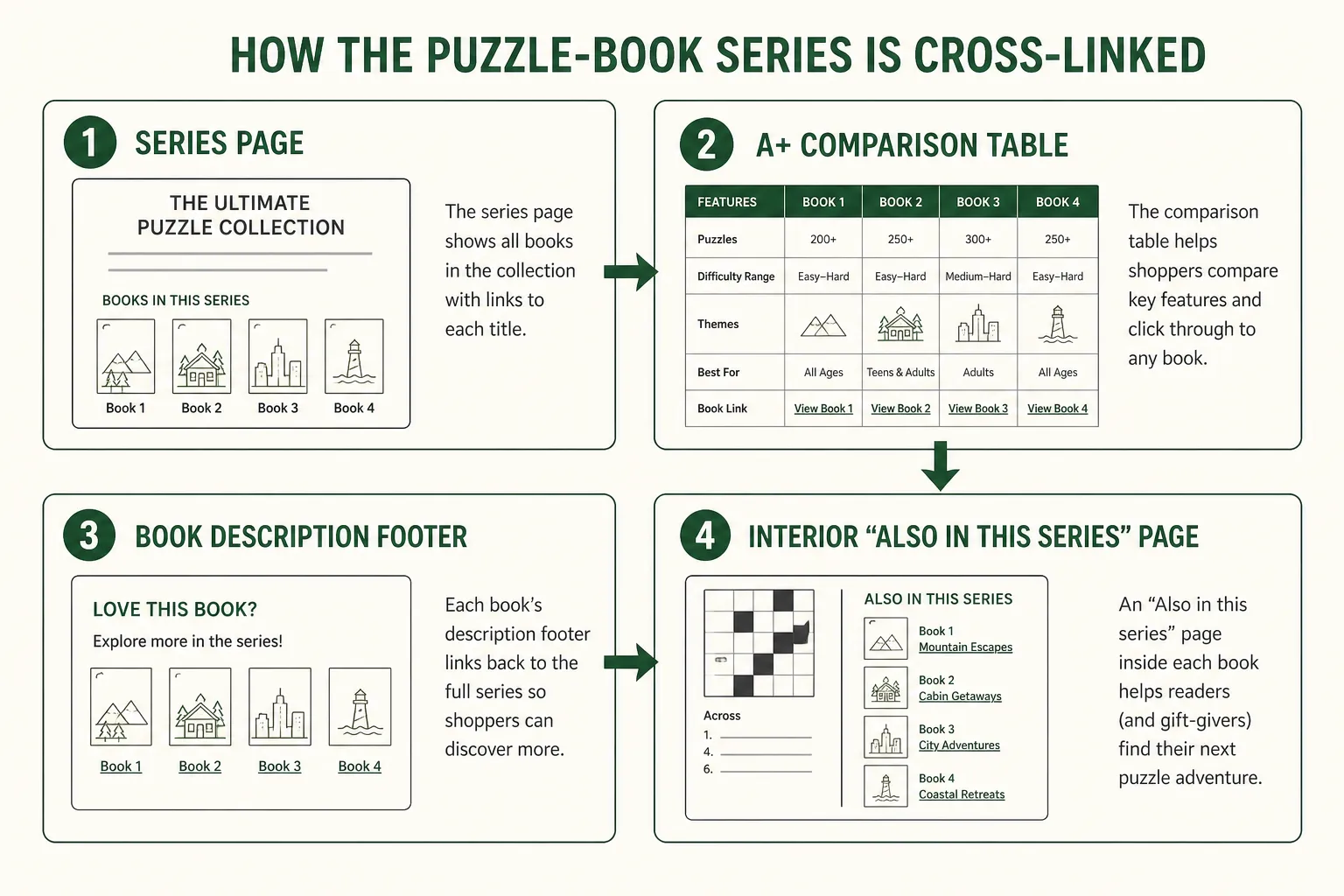
Beyond Amazon's automatic series page, actively cross-link your volumes using every tool available.
A+ Content Comparison Module
In every volume's A+ Content, add a comparison chart showing all volumes in the series: Vol. 1 through the latest, with difficulty, puzzle count, and brief description for each. A buyer who discovers Vol. 3 can immediately see and click through to Vols. 1, 2, and 4.
Book Description Cross-Mention
At the end of every volume's description, add: "Also available in this series: [Series Name] Vol. 1, 2, 3..." This is indexed by Amazon and also reads as a natural series cross-sell in the description.
Interior Front Matter
In the first 2 pages of every volume's front matter, include a "Also in this series" page listing all other volumes. This appears in Amazon's "Look Inside" preview and is seen by buyers who are evaluating the book before purchasing.
Pricing Strategy for a Series
A multi-volume series allows dynamic pricing that a single title cannot use:
Anchor pricing: Vol. 1 priced slightly lower than subsequent volumes to reduce entry barrier. "Try Vol. 1 at $7.99, upgrade to Vol. 2-10 at $9.99" is a proven pattern.
Bundle discounting: Once you have 5+ volumes, create a bundle (KDP does not support official bundles, but you can price a "Complete Series" boxed set if you create it as a single title).
Promotional pricing: Temporarily lower Vol. 1's price during launch of a new volume. The Vol. 1 price drop drives new series entry; the new volume gives returning buyers a reason to return to the series page.
Series-wide price consistency: Volumes 2+ should be identically priced. Inconsistent pricing across a series creates buyer confusion and can trigger complaints ("Vol. 3 is $2 more than Vol. 2 for the same content").
Review Strategy for Series
Reviews compound across a series in ways single titles cannot achieve.
Vol. 1 as the review anchor: Focus review acquisition efforts on Vol. 1. Once Vol. 1 has 20+ reviews, every buyer who discovers any volume in the series sees a well-reviewed series entry point, even if Vol. 4 only has 5 reviews.
Cross-review invitation: In your interior "Also in this series" page, include a sentence: "If you enjoy this volume, your review of [Vol. N] helps other puzzle lovers find the series." This is allowed under Amazon's review guidelines (requesting a review without offering incentive is permitted).
Review momentum: A series with 5 volumes each averaging 4.5 stars across 30+ reviews total creates powerful social proof. Amazon shoppers see the aggregated series reputation, not just the individual volume's score.
Using RodBooks for Series Production
RodBooks is built for series production: consistent settings across volumes, matching front-matter templates, and systematic PDF export that ensures every volume in your series has identical interior quality: same margins, same grid sizing, and the same solution format.
Once you configure your book settings for Vol. 1, those settings can be reapplied to every subsequent volume with minor adjustments (puzzle count, introduction text). This is the production infrastructure a series requires.
Frequently Asked Questions
How many volumes do I need before a series becomes self-sustaining?
In most puzzle niches, 5-7 volumes represents a self-sustaining critical mass. At this point, the cross-sell chain means any buyer who enters the series at any volume is likely to purchase 2-3 additional volumes. Below 3 volumes, series cross-sell impact is minimal.
Should I publish easy, medium, and hard as separate volumes or separate series?
Both approaches work. Separate volumes within one series (Vol. 1 = Easy, Vol. 2 = Medium, Vol. 3 = Hard) works for buyers who want progression. Separate series for each difficulty level works better for buyers who only ever want one difficulty. They search by difficulty level and find your series in each segment. Test both approaches or choose based on your audience's expected behavior.
What happens if I change the series name after publishing some volumes?
Amazon will not automatically aggregate renamed volumes. Existing volumes with the old series name will remain in the old series (even if it has only 2 volumes). You would need to manually update every volume's series metadata, and the series page history (including any "Follow this series" subscribers) cannot be transferred. Avoid renaming a series after publication.
Can two publishers publish in the same series?
No. KDP series metadata is tied to the publishing account. If you use different KDP accounts (personal and business, for example), you cannot merge those volumes into one series page.
Series Launch Checklist
- Series name defined (will not change after Vol. 1 publishes)
- Title formula locked (consistent template for all volumes)
- Cover design system documented (typography, colors, layout)
- Trim size confirmed (same for all volumes)
- Puzzle count per volume confirmed
- Vol. 1 published with series metadata filled in (series name + Vol. 1)
- Vol. 2 production begun before Vol. 1 publishes
- Vol. 2 published within 45-60 days of Vol. 1
- A+ Content comparison table built covering all available volumes
- Description cross-mention added to all published volumes
- Interior "Also in this series" page included in all volumes
- Monthly production cadence planned for Vol. 3-6