How KDP Royalties and Print Costs Are Calculated
How Amazon KDP royalties and print costs work: trim, page count, ink, 50%/60% bands, minimum list price, and a 6×9 puzzle book example,then model your specs in the free calculator.
A KDP royalty calculator answers the question every puzzle publisher asks before upload: after Amazon prints the book, what do I actually keep? List price alone is misleading. Print cost depends on trim size, page count, ink type, and marketplace. Royalty rate depends on list price bands. This guide walks through the full pricing sequence, trim → pages → paper and ink → print cost → 50%/60% royalty bands → minimum list price, then runs a worked example for a 6×9 word search book at about 120 pages. Use the KDP royalty calculator to model your own specs, and always confirm the final numbers in your KDP Bookshelf before you publish.
This is planning guidance based on Amazon’s published print royalty structure, not a promise of future earnings. Rates and print tables can change. Treat any third-party calculator, including RodBooks, as a rehearsal tool. The goal is to avoid uploading a 120-page paperback at $6.99 when manufacturing alone eats the margin.
See also: spine width after page count.
How KDP print royalties are calculated
Amazon KDP paperback and hardcover royalties use a simple formula once you know print cost:
Printing cost = fixed cost + (page count × per-page cost)
Royalty rate = 60% at or above the marketplace threshold, otherwise 50%
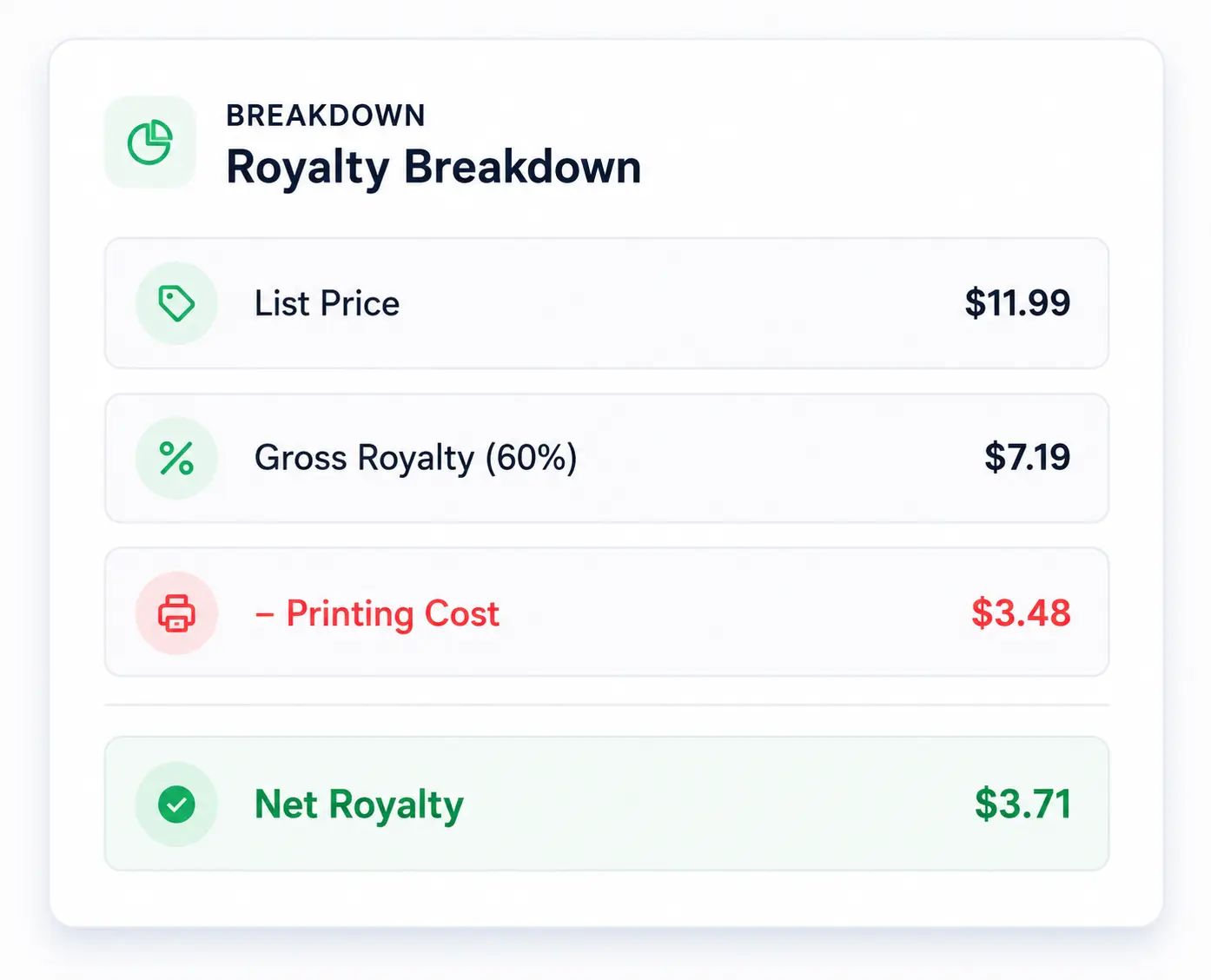
Net royalty = (list price × royalty rate) − printing cost
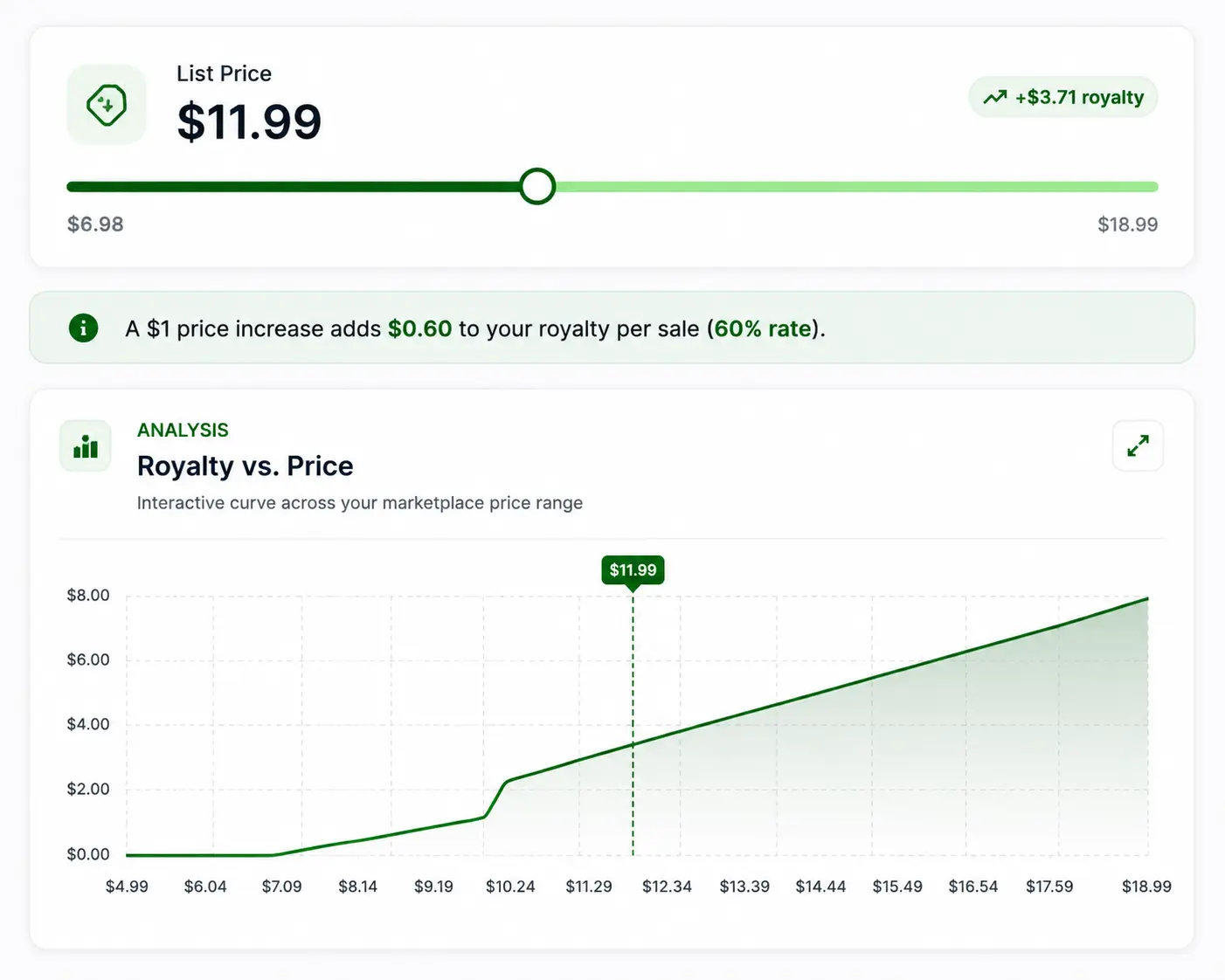
The 60% rate applies when list price meets or exceeds the threshold for that storefront, $9.99 on Amazon.com, £7.99 on Amazon.co.uk, €9.99 across most EU stores, and local equivalents elsewhere. Below the threshold, the 50% rate applies. Minimum list price is derived from the 50% band so royalties still cover manufacturing: roughly print cost divided by 0.50, rounded up. The KDP royalty calculator applies those rules live as you move the price slider.
Kindle eBook royalties (35%/70%) and Kindle Unlimited page reads use different math. Expanded distribution uses a 40% print rate and is not modeled in the standard RodBooks print calculator. This article focuses on paperback and hardcover sold on Amazon storefronts.
Step 1: Choose trim size first
Trim size is not a cosmetic choice for puzzle books. It changes manufacturing tier, how many puzzles fit per page, thumbnail readability, and sometimes whether shoppers expect “travel size” or “large print workbook.” Common KDP trims for activity books include 6×9 in, 7×10 in, 8×10 in, and 8.5×11 in. Amazon groups larger trims into a “large trim” print table with higher per-page costs than regular trims at the same page count.
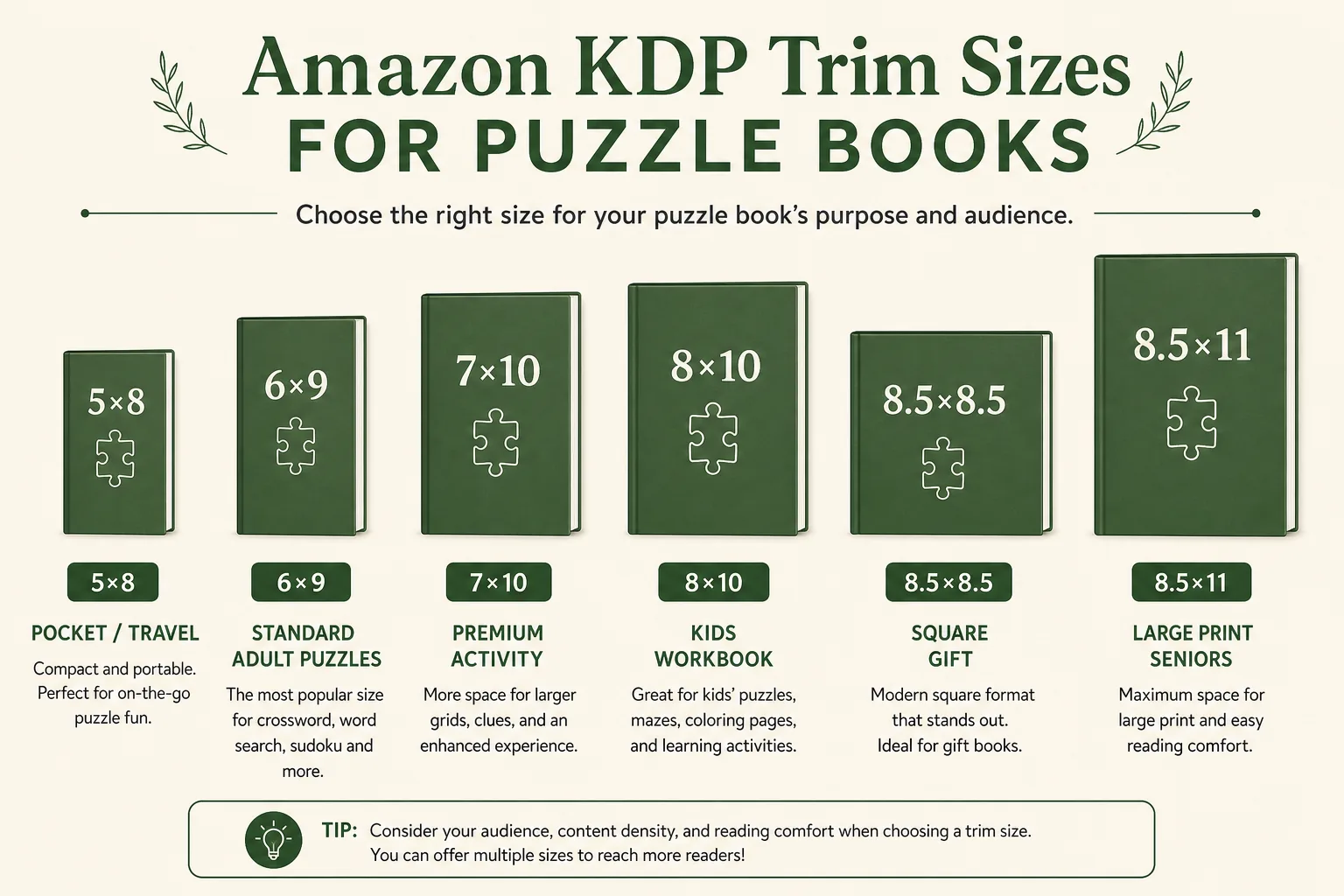
Pick trim before you generate hundreds of puzzles. Switching from 6×9 to 8.5×11 after the interior is built forces a reflow, a new cover wrap, and a different print cost stack. For niche-specific guidance, read best KDP trim sizes for puzzle and activity books. Lock trim in RodBooks generator settings, then carry the same trim into the KDP royalty calculator and the KDP cover designer.
Step 2: Lock an honest page count
Page count is every sheet in the interior PDF you upload, title page, copyright, blanks, puzzles, and solutions. Amazon does not use “puzzle count” as a pricing input; it uses PDF page count. A book marketed as “100 puzzles” might be 118 pages once front matter and answer keys are included. Guessing 100 when the file is 118 misprices the book and misplaces spine width on the cover.
Page count also crosses tier boundaries on black-and-white paperbacks. On Amazon.com, many regular-trim black-ink books at 110 pages or fewer use a short-book fixed fee with no per-page charge in that band. Above 110 pages, a lower fixed fee plus a per-page rate applies, which can mean a jump in print cost when you add solution pages or a few filler leaves. Before you pad the interior, model both sides of the boundary in the KDP royalty calculator.
For how puzzle density affects page count and buyer expectations, see how many puzzles to put in a KDP puzzle book and puzzle book solutions pages for KDP. Export one final PDF, count pages in your viewer, and type that number into the calculator, not the puzzle tally from your outline.
Step 3: Paper type and ink
In KDP you select ink type: black ink, standard color, or premium color. Paper choices (white, cream, color paper) interact with ink settings in the upload flow. For pricing math, the critical decision is whether the interior is black-and-white or color, because color uses higher fixed and per-page tables.
- Black ink on white or cream paper: lowest print stack for most word searches, sudoku, crosswords, and mazes.
- Standard color: common for illustrated activity pages; per-page cost rises quickly on long books.
- Premium color: higher still; justify it only when color is central to the product, not a gray grid tint.
Bleed settings do not change royalty rate by themselves, but full-bleed color backgrounds can push you into color ink and add pages. Read bleed vs no bleed and binding options for KDP books before you assume a white-grid interior is cheap to print. KDP paperbacks are perfect bound, not spiral, which affects gutter margins but not the royalty formula directly.
Step 4: Calculate printing cost
Amazon publishes marketplace-specific print tables. RodBooks mirrors the tiered structure: a fixed cost plus per-page cost, with different tables for regular vs large trim, paperback vs hardcover, and ink type. On Amazon.com for a regular-trim black-ink paperback above 110 pages, the long-band planning numbers are a $1.00 fixed cost plus $0.012 per page. Large trim uses a higher per-page rate in the same band.
| Input | Why it matters for print cost |
|---|---|
| Marketplace | US, UK, EU, CA, AU, JP each has its own currency and table |
| Trim (regular vs large) | 8.5×11 and similar large trims pay more per page |
| Page count | Crossing 110 pages on US B&W regular trim changes tier structure |
| Ink type | Color can multiply per-page cost versus black ink |
| Format | Hardcover uses a separate fixed + per-page hardcover table |
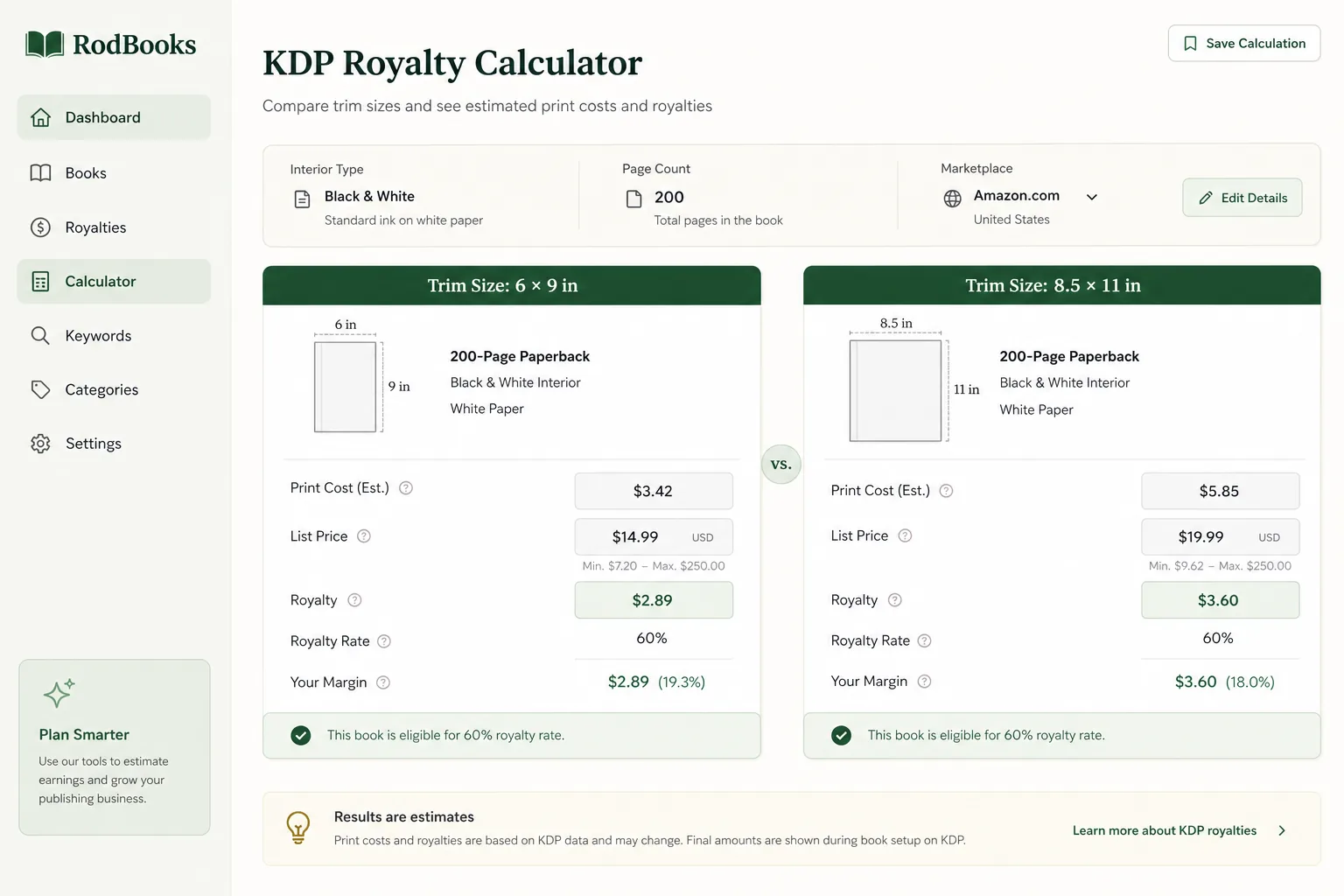
Open the RodBooks KDP royalty calculator, choose marketplace and format, enter trim and page count, and read the print cost panel before you touch list price. If print cost alone is $4.00, a $7.99 list price is not “extra margin”, it may be break-even or a loss depending on royalty band.
Step 5: 50% vs 60% royalty bands
Royalty rate is not chosen in a checkbox. It is implied by list price relative to the marketplace threshold. On Amazon.com, pricing at $9.99 or higher earns 60% of list price before print cost is subtracted. At $9.98 or lower, the rate is 50%. The few cents around the threshold matter: $9.99 vs $8.99 is not only one dollar of list price, it is a ten-point swing in Amazon’s share calculation.
Example with the same print cost ($2.44 on a 120-page US black-ink 6×9 paperback in the long band):
- At $8.99 (50%): gross share $4.50, net royalty about $2.06 after print
- At $9.99 (60%): gross share $5.99, net royalty about $3.55 after print
That step-change is why publishers cluster puzzle paperbacks at $9.99 to $12.99 on Amazon.com when genre norms allow. Competing at $6.99 may still be valid for short books in the low page-count tier, but you should know the band you are in. The calculator’s profit curve shows where the 60% band begins for your selected marketplace.
Step 6: Minimum list price floor
KDP enforces a minimum list price so the 50% royalty path still covers manufacturing. Planning formula: minimum ≈ print cost ÷ 0.50, rounded up to cents (or whole yen/kronor where applicable). If print cost is $2.44, the planning floor is about $4.88. Amazon may also enforce marketplace-specific price floors and increments, always read the error in the KDP price box if a value is rejected.
Minimum price is not the same as a profitable price. A $4.88 floor on a book that took forty hours to produce is technically publishable but commercially thin. Use minimum as a guardrail, then set list price from genre comps, ads budget, and series strategy. Before you spend on Sponsored Products, know net royalty at your planned price, see Amazon Ads for low-content puzzle books for break-even thinking.
Worked example: 6×9 word search book, 120 pages (US)
Assume a black-ink paperback on white paper, Amazon.com, regular trim 6×9, 120 pages total in the PDF (title, copyright, 100 puzzle pages, solutions). This page count sits above the 110-page US tier break, so print cost uses the long-band table:
Print cost = $1.00 + (120 × $0.012) = $2.44
Minimum list price (50% band) ≈ $2.44 ÷ 0.50 = $4.88
List price $9.99 → 60% rate → ($9.99 × 0.60) − $2.44 ≈ $3.55 net royalty
List price $8.99 → 50% rate → ($8.99 × 0.50) − $2.44 ≈ $2.06 net royalty
Now compare the same 120 pages at 8.5×11 large trim on Amazon.com black ink: print cost ≈ $1.00 + (120 × $0.017) = $3.04. Net royalty at $9.99 drops to about $2.95, roughly sixty cents less per sale for the same puzzle count story if layout stayed identical. Large trim can be the right product choice for large-print niches, but it is not free. Model both trims in the KDP royalty calculator before you commit to the interior.
If you add sixteen solution pages and cross from 110 to 126 pages, you also move from the short fixed-fee band into the long per-page band on US regular trim, a double hit if you were not watching the tier. Re-run print cost every time the PDF changes.
Hardcover, color, and international storefronts
Hardcover uses separate fixed and per-page hardcover tables, typically higher floor than paperback. Standard or premium color interiors raise both fixed and variable cost; a 120-page color activity book can carry multiple times the print cost of a black-ink word search at the same trim.
International expansion requires recalculation per marketplace. Amazon.co.uk, Amazon.de, Amazon.ca, Amazon.com.au, and Amazon.co.jp each use local currency, different thresholds for the 60% band, and different print tables. A US $9.99 price that works on Amazon.com is not automatically safe on Amazon.co.uk at £7.99, check local print cost even when the number “looks similar.” The RodBooks calculator supports 14 Amazon storefronts for side-by-side planning.
Connect pricing to the rest of your KDP workflow
Royalty math sits in the middle of publishing workflow, not at the end after the cover is finished.
- Pick trim and niche with trim size research and KDP niche briefs.
- Generate the interior, export the PDF, then count the real page total.
- Run print cost and royalty scenarios in the KDP royalty calculator.
- Build the cover wrap from the real page count using the KDP cover size calculator guide.
- Write listing copy that matches puzzle count and format with the KDP book description formula and the description generator.
- Set backend keywords and categories with KDP keyword best practices and the backend keywords tool.
- Launch ads only after net royalty supports your test budget (see how to market your KDP book).
When bleed, binding, or color choices change the PDF, revisit print cost before you change list price. The bleed vs no bleed guide and this calculator should tell the same page-count story.
Using the RodBooks KDP royalty calculator
The free RodBooks KDP royalty calculator is built for the decisions above:
- Marketplace and currency selector across 14 Amazon stores
- Paperback and hardcover with black, standard color, and premium color ink
- Trim-aware print tables (regular vs large)
- Live minimum list price and net royalty at each slider position
- Royalty-vs-price chart for what-if comparisons
- Strategy hints (max sales, balanced, max profit) plus optional AI pricing notes
Suggested workflow: enter marketplace, format, ink, trim, and final page count; read print cost and minimum price; slide to your target list price; screenshot the breakdown for your project folder; upload to KDP and confirm Amazon’s royalty estimator matches before you click publish. No credits are required for royalty calculator runs on RodBooks.
Common pricing mistakes to avoid
- Pricing from puzzle count instead of PDF page count
- Using a draft page estimate while the cover spine uses a different number
- Ignoring the 60% threshold and leaving money in the 50% band at $8.99
- Switching to color interiors without re-running print cost
- Copying a competitor’s list price in a different trim or page band
- Treating calculator output as guaranteed, Amazon updates tables; verify in KDP
Profitable publishing is mostly alignment: the book shoppers receive matches the listing, and list price matches manufacturing. The calculator removes guesswork from the second half of that sentence.
Frequently asked questions
What is a KDP royalty calculator?
A tool that estimates net paperback or hardcover royalty per sale after Amazon’s 50% or 60% print royalty rate and print-on-demand manufacturing cost. RodBooks uses marketplace-specific tiered print tables so you can test trim, pages, ink, and list price before upload.
How accurate is the RodBooks KDP royalty calculator?
It follows Amazon KDP’s published fixed-plus-per-page print structure and royalty bands. Amazon can update rates. Always confirm the latest royalty estimate in your KDP Bookshelf for the exact file you upload.
Why is my net royalty so low at $6.99?
Print cost is deducted before you keep the rest. Long books, large trim, and color ink raise manufacturing cost. At $6.99 on Amazon.com you may also be in the 50% royalty band, which leaves less gross share before print cost is subtracted.
Does bleed affect KDP royalties?
Bleed is a file geometry setting. It does not change the royalty formula by itself. Bleed can push you into color ink or add pages, which does raise print cost. Price the final PDF specs, not an early mockup.
Does the calculator include Kindle eBook or Expanded Distribution royalties?
No. It focuses on standard KDP print sales on Amazon storefronts. Kindle eBook 35%/70% rules and Expanded Distribution’s 40% print rate use different models.
Which Amazon marketplaces does the calculator support?
Amazon.com, Amazon.co.uk, Amazon.de, Amazon.fr, Amazon.es, Amazon.it, Amazon.nl, Amazon.ie, Amazon.com.be, Amazon.pl, Amazon.se, Amazon.ca, Amazon.com.au, and Amazon.co.jp, each with local thresholds and print tables.
Start publishing free: create a RodBooks account, open the KDP royalty calculator, and price your next puzzle book from print cost up, not from guesswork.